


Mij stipescams. Wy sille jo nea freegje in telefoannûmer te beljen, der in sms nei ta te stjoeren of persoanlike gegevens te dielen. Meld fertochte aktiviteit mei de opsje ‘Misbrûk melde’.

Mear ynfo
Iepen

Still wondering about "translate to Dutch" on context menu

bjkeefe

I asked this about four months ago, and did not get any answer, so I am asking again. Sorry for the repetition.

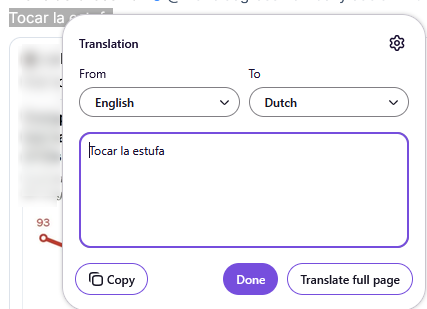
Here is the problem: when I highlight a short passage of text (~3-4 words), and right-click, the context menu always shows the translation entry as "Translate to Dutch". (See first image.) If I accept that, the input language is assumed to be English, so I actually have to change both drop-downs. (See second image.)

If the passage is long enough (> ~4-5 words), the context menu will show "Translate to English", which is what I want, and as an aside, Firefox is almost always correct in detecting the input language.

I can understand it being hard to detect the input language from a short phrase, but why does the output language default to Dutch? And is there a way to change this behavior?

Thanks.
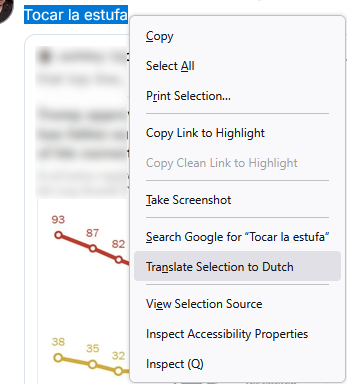
I asked this about four months ago, and did not get any answer, so I am asking again. Sorry for the repetition. Here is the problem: when I highlight a short passage of text (~3-4 words), and right-click, the context menu always shows the translation entry as "Translate to Dutch". (See first image.) If I accept that, the input language is assumed to be English, so I actually have to change both drop-downs. (See second image.) If the passage is long enough (> ~4-5 words), the context menu will show "Translate to English", which is what I want, and as an aside, Firefox is almost always correct in detecting the input language. I can understand it being hard to detect the input language from a short phrase, but why does the output language default to Dutch? And is there a way to change this behavior? Thanks.
Keppele skermôfbyldingen

Jo moatte jo oanmelde by jo account om op berjochten te antwurdzjen. Stel in nije fraach as jo noch gjin account hawwe.