


Windows 10 reached EOS (end of support) on October 14, 2025. If you are on Windows 10, see this article.

Sykje yn Support

Mij stipescams. Wy sille jo nea freegje in telefoannûmer te beljen, der in sms nei ta te stjoeren of persoanlike gegevens te dielen. Meld fertochte aktiviteit mei de opsje ‘Misbrûk melde’.

Mear ynfo

How to delete preference to always store Passkey on device?

  • Gjin antwurden
  • 0 hawwe dit probleem
  • 45 werjeftes
  • Iepenje

What happened: 1) I wanted to create a Passkey for a website and store it in Bitwarden. 2) Bitwarden pop-up opened, but while exploring the options, I accidentally clicked on the option "Use your device or hardware key: Always for this website". 3) Windows Defender dialog popped up with the options "iPhone, iPad or Android device" and "Security key" 4) I backed out of the dialog window 5) I clicked the button to create a Passkey again but going forward only the Windows Defender pop-up appears

The problem: I now cannot create a Passkey to store in Bitwarden on a specific website, because I accidentally clicked on "Use your device or hardware key: Always for this website".

What I've tried that didn't work: - looking through Bitwarden settings - deleting Firefox cookies - doing the same thing in Private Browsing - asking AI and looking through about:config, about:preferences and about:logins, as well as trying to find profile files related to webauth

Found workaround: - creating the Passkey from a different Mozilla profile

I would still very much like to be able to undo the "Always for this website". Is there a way to do that? (Attached images were captured later when recreating the situation.)
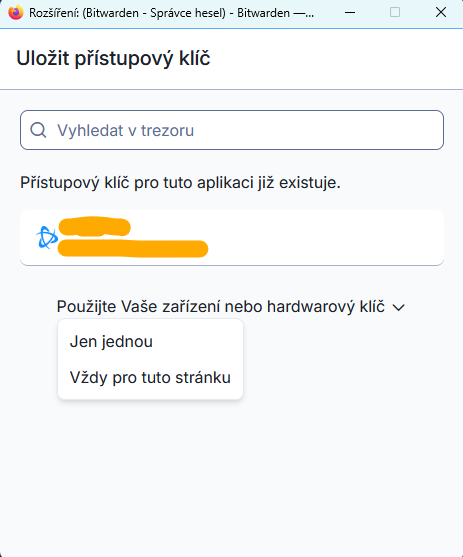
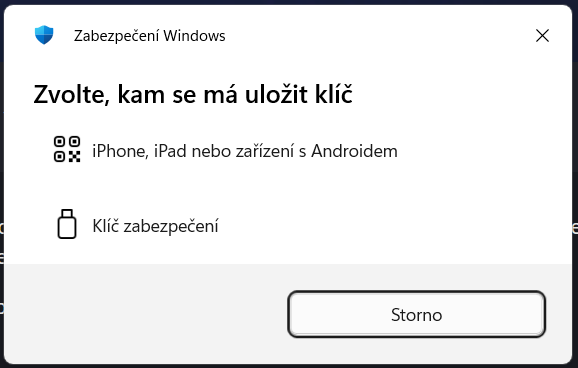
What happened: 1) I wanted to create a Passkey for a website and store it in Bitwarden. 2) Bitwarden pop-up opened, but while exploring the options, I accidentally clicked on the option "Use your device or hardware key: Always for this website". 3) Windows Defender dialog popped up with the options "iPhone, iPad or Android device" and "Security key" 4) I backed out of the dialog window 5) I clicked the button to create a Passkey again but going forward only the Windows Defender pop-up appears The problem: I now cannot create a Passkey to store in Bitwarden on a specific website, because I accidentally clicked on "Use your device or hardware key: Always for this website". What I've tried that didn't work: - looking through Bitwarden settings - deleting Firefox cookies - doing the same thing in Private Browsing - asking AI and looking through about:config, about:preferences and about:logins, as well as trying to find profile files related to webauth Found workaround: - creating the Passkey from a different Mozilla profile I would still very much like to be able to undo the "Always for this website". Is there a way to do that? (Attached images were captured later when recreating the situation.)
Keppele skermôfbyldingen

Jo moatte jo oanmelde by jo account om op berjochten te antwurdzjen. Stel in nije fraach as jo noch gjin account hawwe.