


Windows 10 reached EOS (end of support) on October 14, 2025. For more information, see this article.

Sykje yn Support

Mij stipescams. Wy sille jo nea freegje in telefoannûmer te beljen, der in sms nei ta te stjoeren of persoanlike gegevens te dielen. Meld fertochte aktiviteit mei de opsje ‘Misbrûk melde’.

Mear ynfo

Sending message dialog doesn't close when using Thunderbird with hMailServer

  • Gjin antwurden
  • 0 hawwe dit probleem
mear opsjes

I've recently installed Thunderbird and configured it to connect to a few of the email accounts I've setup. For gmail servers, everything seems to work fine. For a locally run hMailServer server, I can connect, download messages, and even send messages - sort of.

When I try to send an email through the hMailServer account, the message sends correctly: it arrives at the other address quite quickly, and I can see in the server's logs where it connected via SMTP, transmitted the message, received a "250 Queued" response, sent QUIT to log off, and got the "221 goodbye". However the Thunderbird UI itself never progresses past the Sending Message dialog: the status stays at Sending message... and the progress bar is full. I can hit cancel and it prompts to delete the draft, etc., but either way, the message has been successfully sent. This doesn't happen with other accounts, so I'm curious what I need to do to get this to go away or send correctly....

I'm using Thunderbird 147.
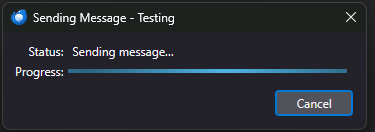
I've recently installed Thunderbird and configured it to connect to a few of the email accounts I've setup. For gmail servers, everything seems to work fine. For a locally run hMailServer server, I can connect, download messages, and even send messages - sort of. When I try to send an email through the hMailServer account, the message sends correctly: it arrives at the other address quite quickly, and I can see in the server's logs where it connected via SMTP, transmitted the message, received a "250 Queued" response, sent QUIT to log off, and got the "221 goodbye". However the Thunderbird UI itself never progresses past the Sending Message dialog: the status stays at Sending message... and the progress bar is full. I can hit cancel and it prompts to delete the draft, etc., but either way, the message has been successfully sent. This doesn't happen with other accounts, so I'm curious what I need to do to get this to go away or send correctly.... I'm using Thunderbird 147.
Keppele skermôfbyldingen

Jo moatte jo oanmelde by jo account om op berjochten te antwurdzjen. Stel in nije fraach as jo noch gjin account hawwe.