


top menu bar has disappeared

hi:
some how, the top menu has disappeared. ESC is not bringing it back
its like firefox has gone to full screen (as when you play a video/movie) and so the top menu disappears. but i cannot get it out of this mode.
any ideas?
thankyou for your helpf.
Solution choisie
Make sure that you do not run Firefox in full screen mode (press F11 or Fn + F11 to toggle; Mac: Command+Shift+F).
You can check for problems caused by a corrupted localstore.rdf file.
You can inspect and manage the permissions (including full screen permission) for the domain in the currently selected tab via these steps:
- Click the "Site Identity Button" (globe/padlock) on the location bar
- Click "More Information" to open Page Info
- Go to the Permissions tab
- Tools > Page Info > Permissions
You can delete the permissions.sqlite file to reset all permissions.
Lire cette réponse dans son contexte 👍 2Toutes les réponses (4)
note: I am not talking about toolbars. i am talking about the top menu bar they are all still showing. see screenshot:
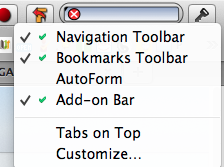
it happened after i went and used mega download site. automatically.
Solution choisie
Make sure that you do not run Firefox in full screen mode (press F11 or Fn + F11 to toggle; Mac: Command+Shift+F).
You can check for problems caused by a corrupted localstore.rdf file.
You can inspect and manage the permissions (including full screen permission) for the domain in the currently selected tab via these steps:
- Click the "Site Identity Button" (globe/padlock) on the location bar
- Click "More Information" to open Page Info
- Go to the Permissions tab
- Tools > Page Info > Permissions
You can delete the permissions.sqlite file to reset all permissions.
What cor-el said:
https://support.mozilla.org/en-US/questions/982643#answer-520055
Modifié le par jscher2000 - Support Volunteer