

[FF4.0b12] Permanently enable the find bar (ctrl+f), except if i manually close it. When the find bar is open, i move to another tab and then the find bar closes automatically. How do i enable it permanently?...

Firefox 4.0b11 or older doesnt have this problem, why does this version do this? I just want the old find bar back please... . . . Thanks ☺☻
Toutes les réponses (4)
This was an intentional change, but the change has just been backed out of the latest development version so that the find bar now stays open when you switch tabs. As it currently stands it looks like Firefox 4 when released will let you switch between tabs without closing the find bar.
Intentional? Why?... or did you imply accidental? . How do I keep it permanently open? Do i have to wait for the next update? . Thanks
It was an intentional change but Mozilla appear to have changed their mind over this. You will have to wait for the next update to keep it open permanently.
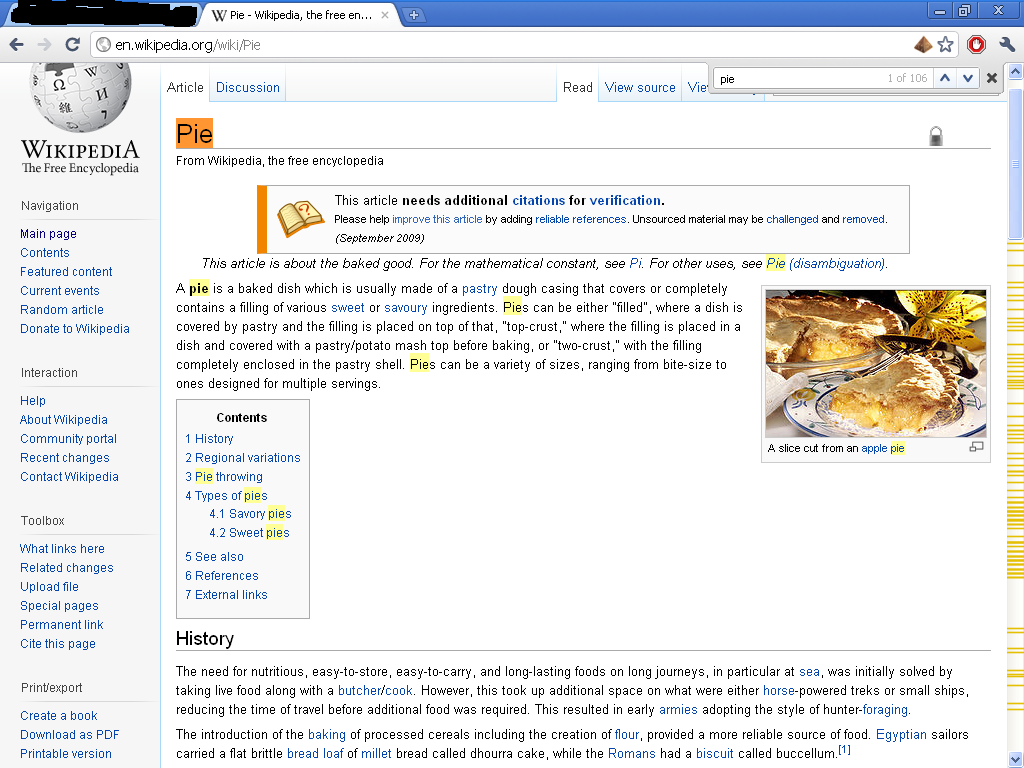
Alright thanks... i dont know why they changed it.... having the find bar opened permanently is supremely useful when searching.............I have a highly good suggestion for improving the find bar (similar to Google Chrome's),
- Add current find out of total finds (Example: 1 of 106)
- Show colored lines of finds on the scroll bar
- Permanently opened find bar
Look at pic for example.
Chrome find bar has 1 flaw:
- Find bar automatically closes if you reload or leave the page.
Modifié le par Pokelus