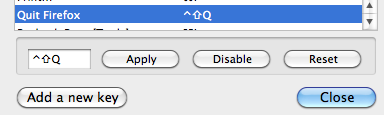
Disable Command-Q Shortcut

Could Mozilla please, please add an option to either A) Disable COMMAND-Q as the Keyboard Shortcut to Quit; or B) add a warning, similar to the "Closing multiple tabs" warning, that asks if you really want to quit when you press this combination?
I can't tell you how many times I've hit CMD-Q when I meant CMD-W or CMD-A, closing the whole program with no warning, losing downloads in progress, losing important open tabs that had to be re-logged in, slowing down my computer, etc.
I tried modifying the combination in OS X's Keyboard Shortcut Preferences, but although this works on other applications, CMD-Q STILL quits Firefox even with this modification.
Please add this as a preference or an add-on! I think if you Google Search, you will find many, many other Firefox users with this issue!
Modifié le par mooseboy
Toutes les réponses (4)
There are several ways to deal with this problem:
First, you should tell Firefox that whenever it starts, it should restore your previous tabs and windows. Click on Firefox menu > Preferences > General. Set "When Firefox starts" to "Show my windows and tabs from last time".
Second, verify that your browser.warnOnQuit setting is set to true. Here's how: Type about:config into the location bar and press enter. You will see a warning message. Click on the "I'll be careful" button. You will see a list of preferences. Then, in the "Filter" box, type warnOnQuit. Check that the value of browser.warnOnQuit is set to true. If it is not, double click on it to set it to true.
Thirdly, there are several add-ons that you can install to control the behavior when you press Command-Q. For example, always-ask and session-manager.
Modifié le par dynamite
Firefox wouldn't let me toggle the browser.warnOnQuit setting in about:config, but from http://hints.macworld.com/article.php?story=2003050112482698 I got this trick that reassigns 'Quit Firefox' to Command-Shift-Q:
defaults write NSGlobalDomain NSUserKeyEquivalents '{"Quit Firefox" = "@$Q";}'
Modifié le par cor-el
For some reason the "default write" solution didn't work for me (I also tried some variants suggested in the macworld article), but one thing that worked well is to install keyconfig and change the shortcut for "Quit Firefox". I actually had this working a few weeks back and when I upgraded Firefox, I disabled some extensions during the upgrade process, and one of those was keyconfig, which brought the problem back. I can 100% confirm that if I disable keyconfig and restart Firefox, the problem comes back, so it does work.