how to maintain zoom level i choose

other browsers accept and keep the zoom level i need firefox makes me enlarge the print on every new page
Toutes les réponses (5)
The Firefox Page Zoom feature does a domain by domain level of saving the users preferred zoom level settings, there is no default Page Zoom level setting in Firefox.
Try the Default FullZoom Level extension:
https://addons.mozilla.org/en-US/firefox/addon/6965
Or the NoSquint extension:
https://addons.mozilla.org/en-US/firefox/addon/2592/
i downloaded both -- don't know how to use them -- problem persists
[signed] the dummy
First off, you don't want both of those extensions, pick one that has the features and interface that you feel comfortable with, and that you can understand.
I'm 79 years old and don't understand either site or wut to do next
First Step: Download and Install NoSquint.
NoSquint extension: https://addons.mozilla.org/en-US/firefox/addon/2592/
After you install NoSquint you will get an additional option in the zoom. Details below.
Second Step: To change the zoom settings
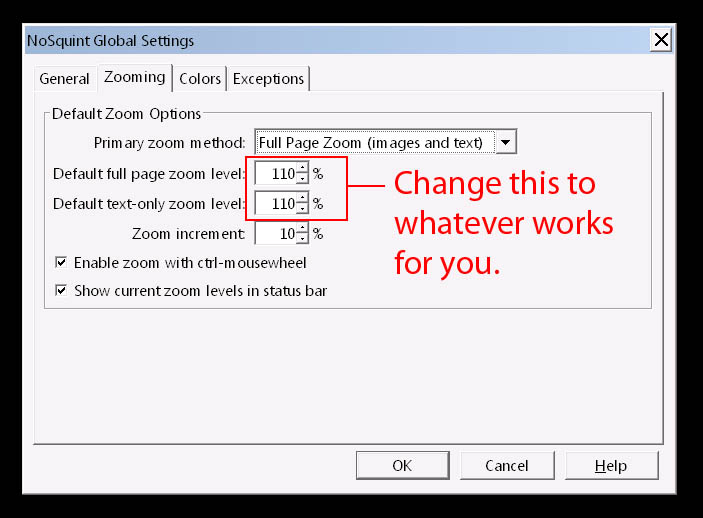
Under View >> Zoom >> Zoom Setting (No Squint)
A new pop up opens where you can set the zoom. There is a tab named, ZOOMING and in there you can change the zoom. There is a percentage, so set it to whateve you like.
I changed both, Full Page and Text-Only, to 110% and it works great. You have some other options in there and feel free to play with them and see what works best for you.
Note: Didn't try the other program. NoSquint worked fine.