


Cannot get started with Mozilla VPN

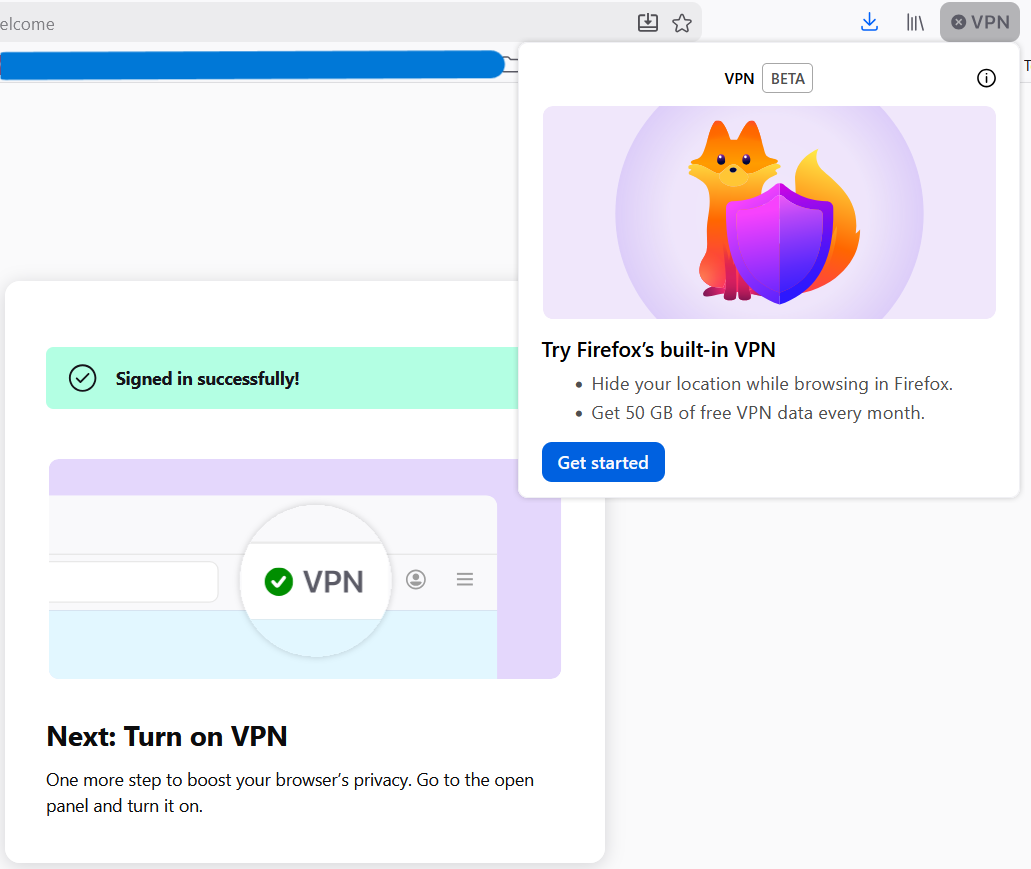
When I open the Mozilla VPN window I am met with the "Get Started" page. I click the "Get Started" button and sign in. When I get to the "Signed in successfully!" page, it tells me to open the Mozilla VPN window again (it does this for me) and to turn it on and all that. However, when the window is opened again, I am met with the same "Get Started" page from the beginning, leaving me in the endless loop of logging in. I am running a fully updated Windows 11. Could it be an extension I have?
Solution choisie
It seems even though it looked like I was logged in to the browser, in reality my account was disconnected. I re-connected it and the VPN seems to be working now.
Lire cette réponse dans son contexte 👍 0Toutes les réponses (4)
Hi Austin,
This looks totally out of normal. I'm probably stating the obvious here, but have you tried restarting the browser to see if it help?
Solution choisie
It seems even though it looked like I was logged in to the browser, in reality my account was disconnected. I re-connected it and the VPN seems to be working now.
Oh, I'm glad you've finally managed to solved it. Happy browsing!