


windows sign in for passwords
Suddenly to use Passwords list on Firefox Windows is demanding I sign into Windows, where previously I used the special "master" password I use only on Firefox. I want to disable this intrusion.
Toutes les réponses (6)

Isa DesOsiers, this might be due to the setting "Require device sign in to fill and manage passwords" being enabled. If you disable this then hopefully things will work how they used to.
See this article for more information, especially the section "Enable or disable password authentication": https://support.mozilla.org/en-US/kb/firefox-password-authentification-prompt
Dear TechHorse, Your prompt reply is very appreciated. For many years I have used a Firefox "Master Password" only to access and manage my Password list in Firefox. The link you sent me shows exactly the pop-up window from MSN Windows requiring me to manage and access my password using my Windows "PIN". Obviously, I trust this current iteration of Microsoft about as far as I can throw it. I do not want it inserting itself into my browser stuff, and why I use MOZILLA products, I trust and support their their ethos. The boxes in Settings for Passwords only allow my Master Password, as per usual, and yet I got the Windows popup and could not look at the password I use for Foxfire Add-on AdBlock Plus !?!?! I was trying to do a Trouble Ticket with them for some porn ads that were getting through, and all that led me to waste a bunch of time trying to stop Windows interfering and invasive BS, yet again, it has become chronic, I am appalled by the inshittification campaign everywhere right now. Sigh... Your fix does not apply, they have overridden Firefox Settings somehow.... IF there is something else I need to uncheck or to do, please advise if know more. Many thanks!
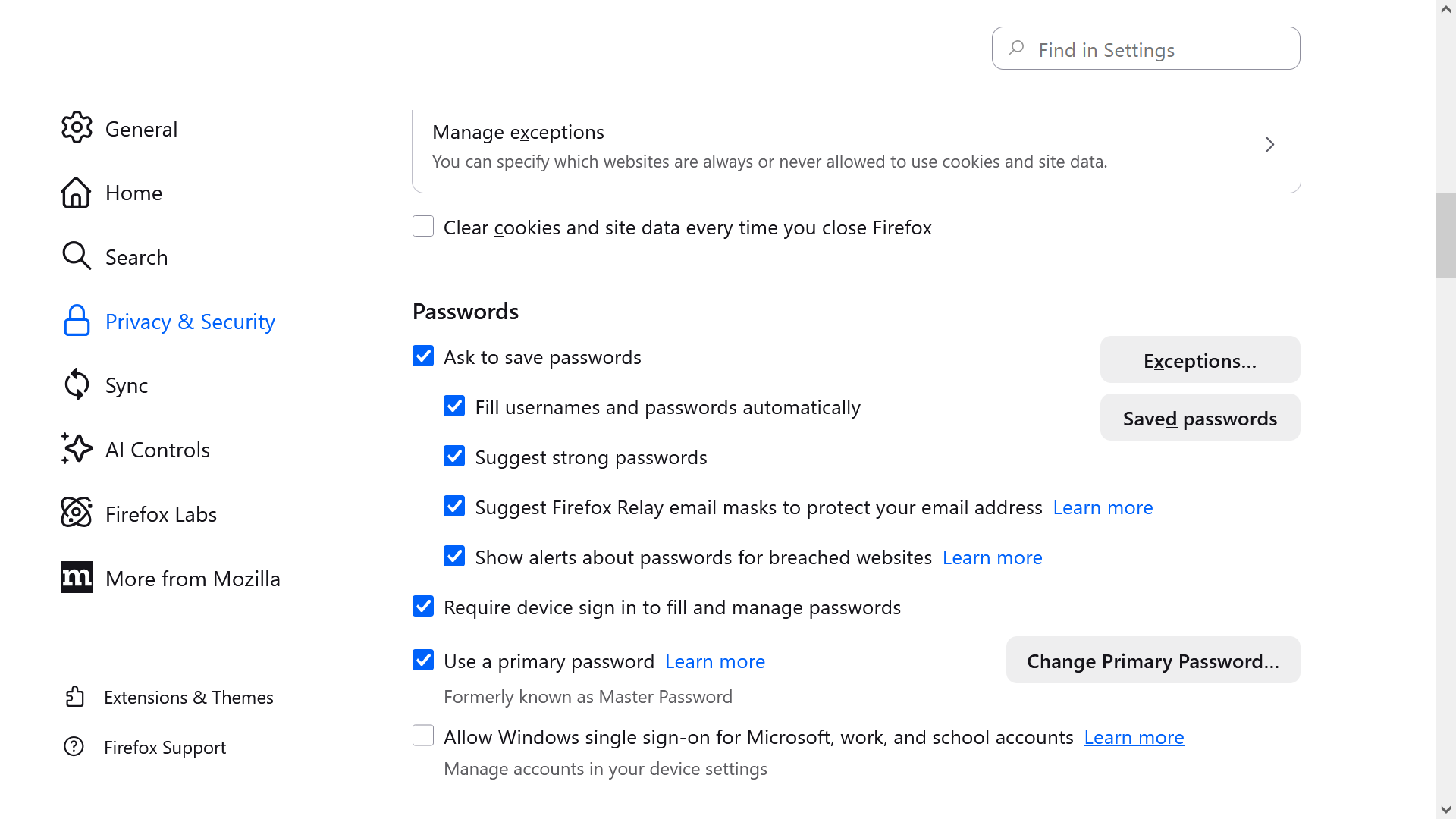
Sorry, I am unable to see the screenshots at my end. (This is not a problem at your end).
Can you confirm, is the setting "Require device sign in to fill and manage passwords" unchecked? And did you restart Firefox after unchecking it?
On another note, I don't think that this is'really Windows inserting itself. I think it is more of a case that Firefox is making use of a security feature that Windows offers. But of course there will be users who will not want to make use of it.
Modifié le par TechHorse
Dear TechHorse, If you read my last, you don't need the screenshot. I have the box checked for the Master Password, now called the Primary Password checked. As always, for many years. And not the box checked for Windows sign in, but Windows is overriding my Foxfire selection. And in Windows I don't see anything to stop this either. I have looked on the internet to see how to stop this linking of Windows sign in with Firefox and other people have this perplexing invasion as well. Thanks anyway.
Isa DesOsiers, if both "Require device sign in to fill and manage passwords" and "Allow Windows single sign-on for Microsoft, work, and school accounts" under Passwords are both unchecked, then the only other setting that I can think of to look at is "Require device sign in to autofill and manage payment methods" under Payment methods.
(Although if that is checked then you may wish to investigate the option first before deciding whether to turn it off.)
Aside from that, you might try Troubleshoot mode to see if it still happens there.
Sorry, hope someone else knows the answer if this doesn't help.
Modifié le par TechHorse
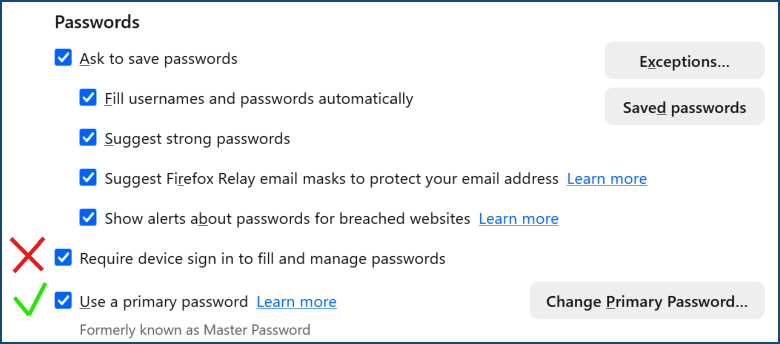
Hi Isa, I can see your screenshot. You do have the "Use a primary password" checkbox checked. This is what you want. But you also have the checkbox "Require device sign in to fill and manage passwords" checked. This is, if I understood you, NOT what you want. This tells Windows to use Windows Hello (the part that handles PIN and fingerprint and/or face recognition) to cryptographically challenge the special security chip in your machine (the TPM) to release the encryption secret. See your attached screenshot, where I marked the checkbox that you need to clear with the red cross. Leave the other one checked.
> Obviously, I trust this current iteration of Microsoft about as far as I can throw it.
I understand your sentiment, but think of this: there is no way around the OS that you run Firefox on. If you don't trust the OS manufacturer, the only thing you can realistically do is use a different OS. Every key that you type when entering your password has to go through the whole Windows stack of drivers. If you don't trust the OS with the sequence of keys that you type when entering the password, it doesn't matter any longer how Firefox' handles it.
Windows Hello is in fact much superior to the password if you have a hardware TPM chip. Most modern computers and Intel CPUs do (it may be disabled in the BIOS). Your PIN is checked by the special hardware chip, the TPM, and it has an anti-hammering delay: every invalid PIN entry increases the cool-off time before it even accepts another attempt at the PIN (or biometric signature). This is why short numeric PIN is much more secure that long complicated passwords. Firefox derives the key from your password. If your computer or disk is lost or stolen, the encrypted file is susceptible to the decryption attempt (e.g., a dictionary attack): the attacker can try hundreds of thousands passwords per second. The TPM chip is designed to be a fortress, and the key that encrypts your stored passwords file is derived from the secret stored inside the TPM secret. This key is cryptographically secure, it looks like a random string, not a password that has structure that you can remember.
Research and decide. Passwords are the weakest form of security.
Modifié le par Cy K. Nelson