

Ce sujet de discussion a été archivé.
Veuillez poser une nouvelle question si vous avez besoin d’aide.

Résolu
Archivé
Firefox did an unauthorized update and I would just like to go back to my previous version. How do I find out what that version was?

Firefox did an unauthorized update and I would just like to go back to my previous version. How do I find out what that version was?
Firefox did an unauthorized update and I would just like to go back to my previous version. How do I find out what that version was?
Toutes les réponses (3)

Solution choisie
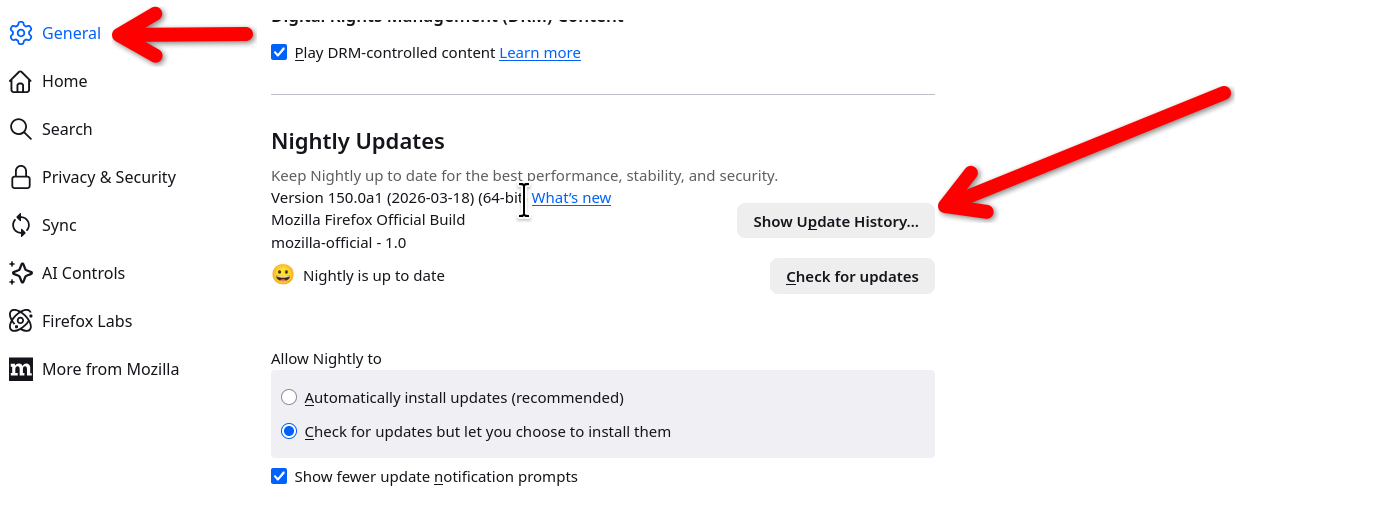
Go into your settings and you can see the update history. see screenshot With this link you can get your desired version. https://ftp.mozilla.org/pub/firefox/releases/
Hello
About, Show fewer update notification prompts https://connect.mozilla.org/t5/ideas/remove-the-update-dot-from-application-menu-on-nightly/idc-p/45397/highlight/true#M26249
For information purposes, about, DisableAppUpdate https://connect.mozilla.org/t5/discussions/upgrade-notification-spam/m-p/64080/highlight/true#M22529

multiple options for 149.0.2. How do i know which one to choose?
Modifié le par jtdmatt