Résolu
Double entry for different versions in the "Installed applications" section
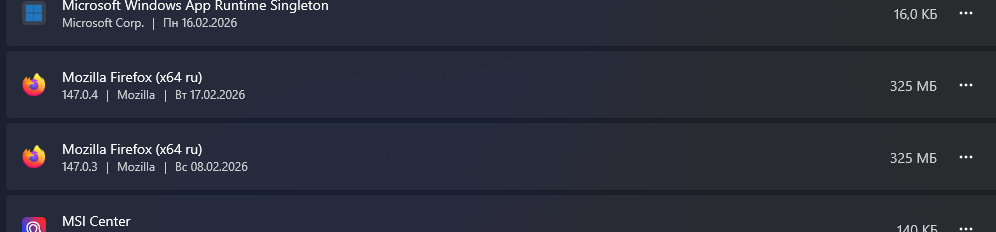
Good day! Initially, I installed Firefox version (x64 ru) 147.0.3. After updating via the "Help - About Firefox - Update" menu, I received version 147.0.4. However, there are two entries about installed Firefox in the Windows section "Installed applications": 1. Mozilla Firefox (x64 ru) 147.0.3 and 2. Mozilla Firefox (x64 ru) 147.0.4. Although one instance of the program is installed. How do I remove an extra entry? Thank you.
PS: I have Windows 11 Pro 25H2 (26200.7840, 1000.26100.291.0) Russian CPU AMD Ryzen 5 5600X 6-Core Processor RAM 32,0 ГБ System x64 Video NVidia GeForce 1650
Good day!
Initially, I installed Firefox version (x64 ru) 147.0.3.
After updating via the "Help - About Firefox - Update" menu, I received version 147.0.4.
However, there are two entries about installed Firefox in the Windows section "Installed applications":
1. Mozilla Firefox (x64 ru) 147.0.3 and 2. Mozilla Firefox (x64 ru) 147.0.4.
Although one instance of the program is installed.
How do I remove an extra entry?
Thank you.
PS:
I have Windows 11 Pro 25H2 (26200.7840, 1000.26100.291.0) Russian
CPU AMD Ryzen 5 5600X 6-Core Processor
RAM 32,0 ГБ
System x64
Video NVidia GeForce 1650
Toutes les réponses (1)
Solution choisie
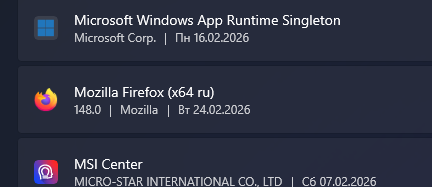
In 148.0 it is fixed! :)