


Windows 10 reached EOS (end of support) on October 14, 2025. For more information, see this article.

Rechercher dans l’assistance

Évitez les escroqueries à l’assistance. Nous ne vous demanderons jamais d’appeler ou d’envoyer un SMS à un numéro de téléphone ou de partager des informations personnelles. Veuillez signaler toute activité suspecte en utilisant l’option « Signaler un abus ».

En savoir plus

Firefox update to 143 cannot open html with image from network file

  • 1 réponse
  • 0 a ce problème
  • 46 vues
  • Dernière réponse par ramontochip

options supplémentaires

Ubuntu 22.04.5 (kernel 5.15.0-153) Firefox updated from 142 to 143 automatically by snap.

In version 142 and older, html file with image source pointing to local (remote) network image file displays properly.

In version 143, this does not work anymore. I tried changing the image to point to a local computer file and it works.

In verion 143, If the link to the image is typed directly to the address tab in firefox, it works.

Perhaps some config setting need to be changed? Hope somebody can help.

Thanks in advance.

firefox network tab shows NS_ERROR_CONNECTION_REFUSED
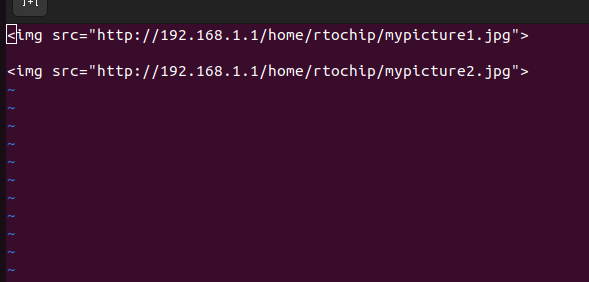
Ubuntu 22.04.5 (kernel 5.15.0-153) Firefox updated from 142 to 143 automatically by snap. In version 142 and older, html file with image source pointing to local (remote) network image file displays properly. In version 143, this does not work anymore. I tried changing the image to point to a local computer file and it works. In verion 143, If the link to the image is typed directly to the address tab in firefox, it works. Perhaps some config setting need to be changed? Hope somebody can help. Thanks in advance. firefox network tab shows NS_ERROR_CONNECTION_REFUSED
Captures d’écran jointes

Solution choisie

After much research, it turns out security.mixed_content.upgrade_display_content needs to be set to false.

steps: type about:config in firefox address bar and enter. agree to "accept the risk and continue"

search for "security.mixed_content.upgrade_display_content".

change the value to "false" for both security.mixed_content.upgrade_display_content and security.mixed_content.upgrade_display_content.image

thank you.

Lire cette réponse dans son contexte 👍 0

Toutes les réponses (1)

options supplémentaires

Solution choisie

After much research, it turns out security.mixed_content.upgrade_display_content needs to be set to false.

steps: type about:config in firefox address bar and enter. agree to "accept the risk and continue"

search for "security.mixed_content.upgrade_display_content".

change the value to "false" for both security.mixed_content.upgrade_display_content and security.mixed_content.upgrade_display_content.image

thank you.

Poser une question

Vous devez vous identifier avec votre compte pour répondre aux messages. Veuillez poser une nouvelle question, si vous n’avez pas encore de compte.