


address bar remembers keyword search

I actively use keywords to search from the address bar, mainly g for google, gs for google scholar and w for wikipedia. Until a recent update (until last week, I think), pressing ctrl + L to go to the address bar would select all the text in the address bar, including the keyword, such that if I had made a google search by typing g and some query, I could immediately do a wikipedia search by typing w and some query.
Now, with an updated firefox (141.0.3, on xubuntu 24.04), the search engine from the previous search remains when I press ctrl + L, so I have to type backspace(s) to remove the search engine keyword, before typing a new keyword.
Is it possible to get the old behaviour back?
Solution choisie
Hello
Firefox release notes https://www.firefox.com/en-US/releases Since https://www.firefox.com/en-US/firefox/137.0/releasenotes
Search Term Persistence: Now when you refine a search in the address bar, the original term sticks around, making it easier to adjust your queries and find exactly what you're looking for.
What happens, if you uncheck, Show search terms in the address bar on results pages.
Toutes les réponses (4)
Hello
Unless I misunderstood.
Have you tried, the checkbox Show search terms in the address bar on results pages.
Extra Information about, Add the Search bar to your Firefox toolbar. https://support.mozilla.org/en-US/kb/add-search-bar-firefox-toolbar
If, you drag the Search bar into the toolbar, the option, Show search terms in the address bar on results pages, not appears.
If, you drag the Search bar out of the toolbar, the option, Show search terms in the address bar on results pages, appears.
Screenshot below.
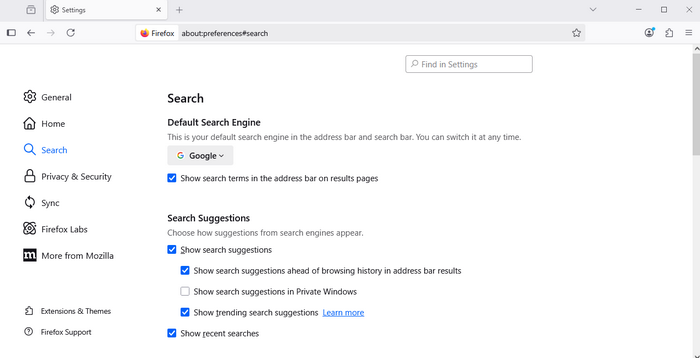
The box to Show search terms is checked.
Solution choisie
Hello
Firefox release notes https://www.firefox.com/en-US/releases Since https://www.firefox.com/en-US/firefox/137.0/releasenotes
Search Term Persistence: Now when you refine a search in the address bar, the original term sticks around, making it easier to adjust your queries and find exactly what you're looking for.
What happens, if you uncheck, Show search terms in the address bar on results pages.
That worked! Many thanks.
(Now I feel very silly for not checking that myself.)