


Windows 10 reached EOS (end of support) on October 14, 2025. For more information, see this article.

Rechercher dans l’assistance

Évitez les escroqueries à l’assistance. Nous ne vous demanderons jamais d’appeler ou d’envoyer un SMS à un numéro de téléphone ou de partager des informations personnelles. Veuillez signaler toute activité suspecte en utilisant l’option « Signaler un abus ».

En savoir plus

Discord, Miro Board, Google Pay, etc. don't load (Solved)

  • 1 réponse
  • 1 a ce problème
  • 141 vues
  • Dernière réponse par Colin Larkin

I was having an odd issue the other day, that I now solved by comparing the settings on a working Firefox profile with mine.

For some reason, on one of my multiple Firefox profiles a list of web apps wasn't working. Among them were Discord, Miro Board, and Google Pay. I was suspecting that they all had the same issue, but didn't know what it was at that time.

The security settings were the obvious suspect (Ad-blockers, DNS, HTTPS enforcement etc.) because clearly something was being blocked, however nothing helped. The solution was in the Network settings. (See screenshot) I was using Manual proxy settings from the time I messed with I2P networks (or something similar).

I am not sure why having a proxy to localhost (127.0.0.1) on HTTP would somehow cause very specific major apps to stop working, while others keep working fine, but it happened to me anyway.

For anyone in a similar situation, with those particular apps not working, check your proxy settings.
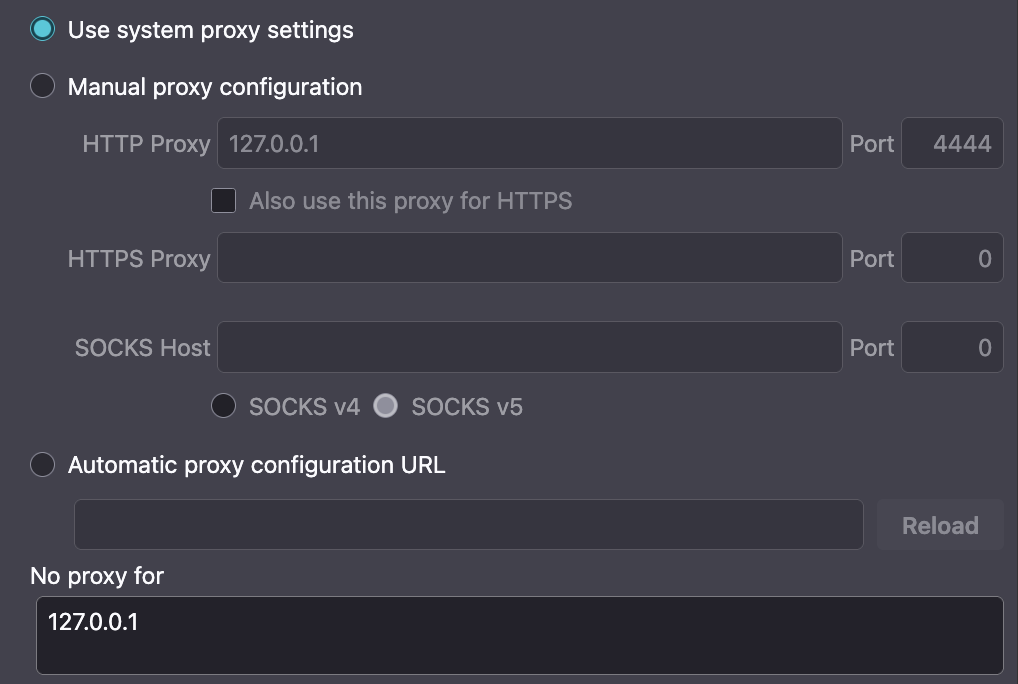
I was having an odd issue the other day, that I now solved by comparing the settings on a working Firefox profile with mine. For some reason, on one of my multiple Firefox profiles a list of web apps wasn't working. Among them were Discord, Miro Board, and Google Pay. I was suspecting that they all had the same issue, but didn't know what it was at that time. The security settings were the obvious suspect (Ad-blockers, DNS, HTTPS enforcement etc.) because clearly something was being blocked, however nothing helped. The solution was in the Network settings. (See screenshot) I was using Manual proxy settings from the time I messed with I2P networks (or something similar). I am not sure why having a proxy to localhost (127.0.0.1) on HTTP would somehow cause very specific major apps to stop working, while others keep working fine, but it happened to me anyway. For anyone in a similar situation, with those particular apps not working, check your proxy settings.
Captures d’écran jointes

Solution choisie

Not to spam actual support people, I will close the question as resolved.

Lire cette réponse dans son contexte 👍 0

Toutes les réponses (1)

Solution choisie

Not to spam actual support people, I will close the question as resolved.

Poser une question

Vous devez vous identifier avec votre compte pour répondre aux messages. Veuillez poser une nouvelle question, si vous n’avez pas encore de compte.