


Disable Windows notifications coming from a specific extension

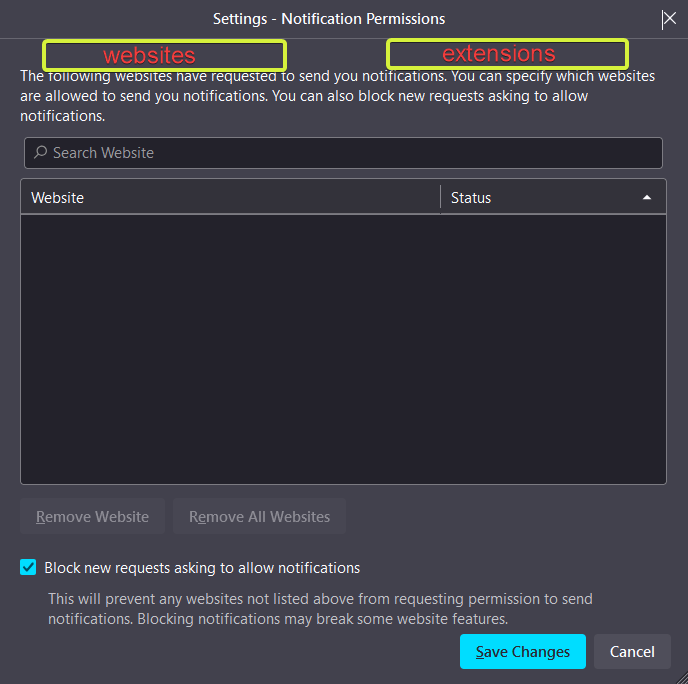
On Windows, any notification coming from any Firefox extension, appears to be coming from the Firefox app. It would be cool to add a feature under (Privacy and Security --> Notification settings --> See attached image) that would allow to specify which extensions are allowed to send notifications and which are not.
Modifié le par NoahSUMO
Toutes les réponses (4)
Otherwise, is there any known workaround to disable notifications coming from a specific extension?
Thank you!
For example, having two tabs here, one for websites, and one for extensions that send notifications

Extension issue and usage problem is to contact their developer for support.
This is not an extension issue. Please do not reply if you do not know the answer.
The question is related to extensions in general, and it does not make sense to go asking each extension developer to remove notifications.
The question is about getting the browser itself, to not relay the notifications from specific extensions.
There is already a workaround here: https://www.reddit.com/r/firefox/comments/n73flz/how_do_you_disable_notifications_from_specific/
but I was asking to know if there is another hidden way by enabling/disabling a flag for example, because the workaround above resets each time there is an extension update, so it would make more sense if Firefox had this added to its extensions settings page.