


GMX Mail Error mit Mozilla Firefox for Zorin 1.0 Version 132.0 (64-bit)
I use Zorin OS 17 Pro and Mozilla Firefox for Zorin 1.0 Version 132.0 (64-bit).
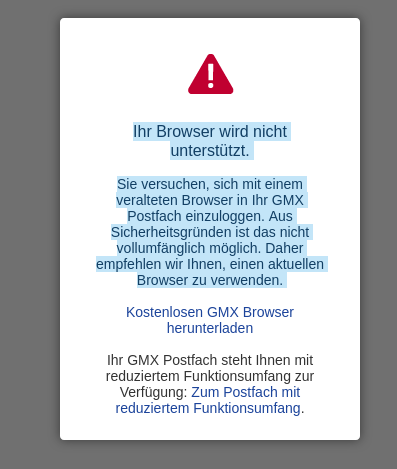
Currently I get an error after logging in to gmx.net “Your browser is not supported.
You are trying to log in to your GMX mailbox with an outdated browser. For security reasons, this is not fully possible. We therefore recommend that you use an up-to-date browser. ”
Can you please fix this error?
Solution choisie
Okay, I was able to fix my error. :star_struck: :yum:
Step 1: Remove Firefox for Zorin sudo apt remove Firefox
Step 2: Remove Flatpak Firefox via Software
Step 3: Open files and show hidden files. Remove all folders from Firefox
Step 4: sudo apt install firefox
Login with Firefox account
Bug fixed, now the Zorin 1.0 Firefox 132 works again
Unfortunately, I do not know what caused this error :roll_eyes: :thinking: :face_with_head_bandage:
Lire cette réponse dans son contexte 👍 0Toutes les réponses (4)
I have tested with flatpak version Firefox with no errors. but I don't want to have an extra flatpak Firefox.
Modifié le par Marcus Grunwald

is Firefox crashing on your computer? It's just that on my very often
No Firefox is not crashing on my computer.
Solution choisie
Okay, I was able to fix my error. :star_struck: :yum:
Step 1: Remove Firefox for Zorin sudo apt remove Firefox
Step 2: Remove Flatpak Firefox via Software
Step 3: Open files and show hidden files. Remove all folders from Firefox
Step 4: sudo apt install firefox
Login with Firefox account
Bug fixed, now the Zorin 1.0 Firefox 132 works again
Unfortunately, I do not know what caused this error :roll_eyes: :thinking: :face_with_head_bandage: