


msn.com using pop3

I use pop3 for all my emails. I am setting up a new computer (not copying over old email backups) and trying to get my msn.com and live.com set up. It keeps telling me my username or password is incorrect. I can sign into the microsoft email directly, so I know they are correct. In thunderbird I add email and password for the msn email. click on pop3 - it auto populates the info. but when I click done - it states: unable to login at server. probably wrong configuration or username and password. (I did try imap with the same username and password and it worked - I just prefer to keep everything on my computer)
Toutes les réponses (15)
Use these settings: incoming IMAP outlook.office365.com, 993, SSL/TLS, OAuth2, email address; outgoing smtp.office365.com, 587, STARTTLS, OAuth2, email address. Same for POP, except incoming port 995.
I tried these settings, and they didn't work. They are the same ones I have been trying to use. I know my password is correct as I can sign into the msn email account directly. I have a new computer and downloaded thunderbird today so I know it's the latest version. I am using pop so I put in the port 995. If I try imap It will work with port 993. But the pop won't .. it states: unable to login at server. probably wrong configuration or username and password
Do you have two-step verification on the account? If so, disable it and enter the account (not app) password in the OAuth window.
Did you try to convert from IMAP to POP by just changing the port? Check Server Type in Account Settings. An IMAP server type won't work with POP settings, and vice versa.
I turned off oauth in the msn email account.
Do you mean in thunderbird to change the authentication method to "normal password" ?
and I didn't convert imap to pop. Each time I tried to add the account, I tried a new configuration, I didn't change from one to the other
Turning off OAuth2 won't help, as after mid Sept. it will be mandatory. Use the settings in my first reply, don't use 'normal password'. If you have a VPN, disable it, and if your antivirus is something like AVG/Avast/Norton, remove (not disable) it.
ok - in the msn account, oauth2 is turned on. I disabled VPN on my computer, and I removed McAfee, I applied all the settings you supplied in your first reply for pop3 (and they are the same settings that populate in thunderbird also), after all this, it still said:: unable to login at server. probably wrong configuration or username and password. I have worked in the computer industry for over 45 years, when it was first called data processing and then computer science. and so many names after that. lol. this really has me baffled. and this is a new computer, and I started all over with my email accounts (I didn't bring over the backup files) so I'm sure the settings are correct as all the other emails are pop3 and they worked. but the msn.com and the live.com will not work with pop3, imap works for them though. hhmm. any other ideas?
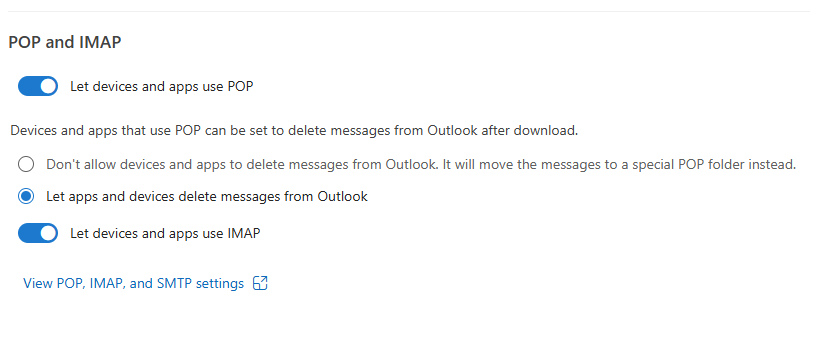
IMAP is usually enabled by default in an account's webmail settings, but not POP. Open the account in webmail, and under Settings, Forwarding and IMAP, Sign in, enable POP (see picture).

that worked - and I have one live.com account .. I will try it on there also -- thanks --
it states: unable to login at server. probably wrong configuration or username and password (same as what I use to get with the msn.com email)
let me check 2 factor verification
two step is turned off for the live.com email ..
pop3 was clicked on
I also clicked off imap - leaving only pop3 - and it still didn't work