


Can't create filter Thunderbird 102.6.1 MacOS 12.6.2.
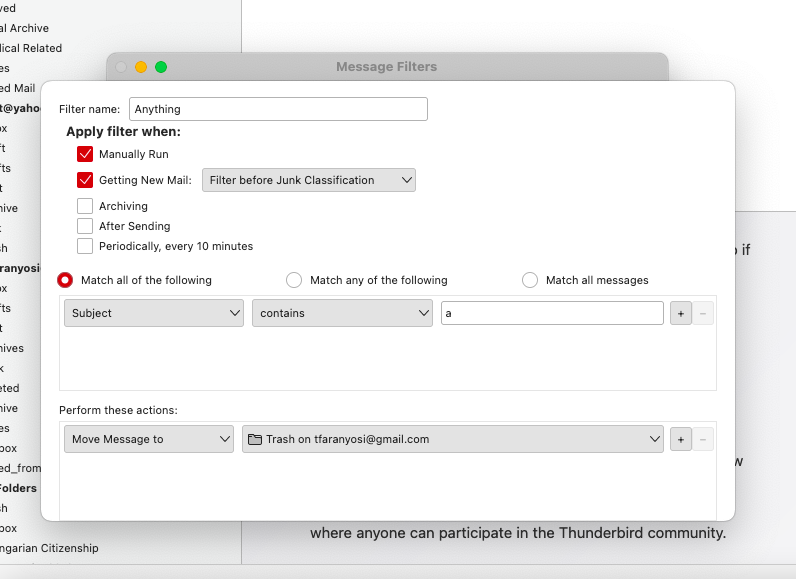
When I try to create a filter there is no "OK" button, so obviously filter can't be created. I tried the command % sudo rm ~Library/Thunderbird/Profiles/vwybotat.default % session.json Got the response zsh: no such user or named directory: Library
Solution choisie
tfaranyos said
As long as it's running in safe mode the filter creator is working properly, but when I start TB normally the "OK" button disappears again. Well, it better than nothing. Thanks for your help
Launch in safe mode, check 'Reset toolbars & controls', 'Make changes & restart'. Does it now look right?
Lire cette réponse dans son contexte 👍 0Toutes les réponses (7)
have you tried just dragging the bottom of the dialog down to expose the OK button? I am guessing you accidentally dragged it up to hide it.
I can drag the window taller but the "OK" button does not show up. Good try, thanks
Test for a broken layout (toolbars or controls) by running in safe mode (hold Option when launching TB).
As long as it's running in safe mode the filter creator is working properly, but when I start TB normally the "OK" button disappears again. Well, it better than nothing. Thanks for your help
did you perhaps in the past modify a preference to scale the user interface?
Solution choisie
tfaranyos said
As long as it's running in safe mode the filter creator is working properly, but when I start TB normally the "OK" button disappears again. Well, it better than nothing. Thanks for your help
Launch in safe mode, check 'Reset toolbars & controls', 'Make changes & restart'. Does it now look right?
That did the trick! The "OK" button is there. Thank you very much