


Can't open a PDF in Firefox on Mac

Recently I am unable to open PDFs in Firefox, but no problem with other browsers such as Chrome. I have not changed anything and the other posts about this problem did not provide a solution for my system. Photo attached shows the blank screen I'm given when clicking on a PDF.
Toutes les réponses (5)
Unfortunately, the screenshot didn't upload, but let me suggest two things to check:
(1) Downloads list
If you check the Downloads list (either the toolbar button or Command+J), is the PDF listed there as either having downloaded successfully or having failed or been blocked?
(2) Viewer enabled
This is a hidden setting:
(A) In a new tab, type or paste about:config in the address bar and press Enter/Return. Click the button accepting the risk.
More info on about:config: Configuration Editor for Firefox. The moderators would like us to remind you that changes made through this back door aren't fully supported and aren't guaranteed to continue working in the future. Since we are checking for a non-default setting, I feel comfortable mentioning it.
(B) In the search box in the page, type or paste pdfjs.disabled and pause while the list is filtered
(C) If the preference is bolded and has of value of true, double-click it to restore the default value of false (if it is already false, try switching to true and back to false)
Thanks jscher2000
1. No it does not download 2. I tried this, but nothing happened. Do I need to close out of Firefox and relaunch?
Any other suggestions?
(Re-attached screen grab)
You should not need to restart Firefox after changing the pdfjs.disabled setting, just try the PDF again.
I should have asked: is the problem only with the "Open in Firefox" option for PDFs on the Settings page? If you change that to "Always ask" and then in the download dialog select "Open with Firefox" does that work?
About that setting: View and edit PDF files using Firefox’s built-in viewer
"Always ask" didn't work, but I went to the Applications section and switched PDF to Save File and am now able to download! Still not sure how to get PDFs to open in Firefox, but at least I can download. Odd that this setting randomly changed on it's own.
Thanks for your help!
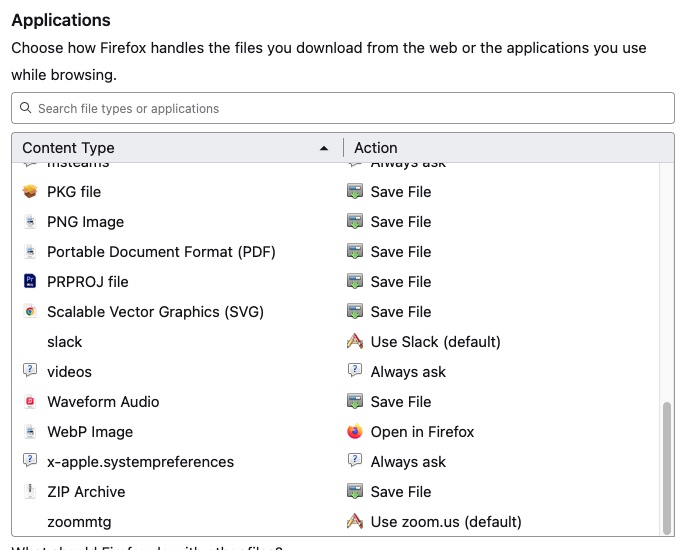
Normally Firefox has "Open in Firefox" and it works fine. We checked the most obvious reason it might not; there must be something else going wrong.