


Windows 10 reached EOS (end of support) on October 14, 2025. If you are on Windows 10, see this article.

Rechercher dans l’assistance

Évitez les escroqueries à l’assistance. Nous ne vous demanderons jamais d’appeler ou d’envoyer un SMS à un numéro de téléphone ou de partager des informations personnelles. Veuillez signaler toute activité suspecte en utilisant l’option « Signaler un abus ».

En savoir plus
Résolu Archivé

after installing the extension video downloadhelper it's impossible to uninstall

cor-el a répondu
Kylianalex

i've tried everything, safe/troubleshoot mode, manually uninstalling and even refreshing firefox in normal or safe mode, the extension has the "Can't be removed" button the profile directory (/home/xxx/.mozilla/firefox/v6kxe18l.default-release-1648663005215/ for me) don't have a extension folder after refreshing firefox, when booting up i immediately get the extension reinstalled

This is clearely skooky behavior in my opinion and I really don't want this extension
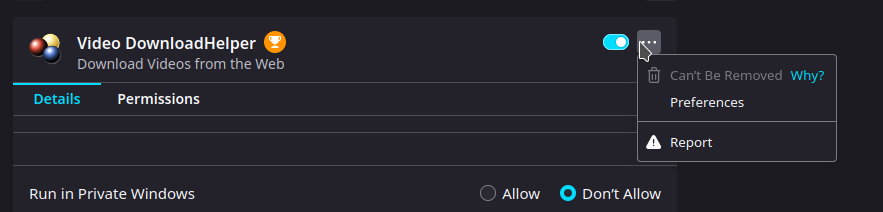
i've tried everything, safe/troubleshoot mode, manually uninstalling and even refreshing firefox in normal or safe mode, the extension has the "Can't be removed" button the profile directory (/home/xxx/.mozilla/firefox/v6kxe18l.default-release-1648663005215/ for me) don't have a extension folder after refreshing firefox, when booting up i immediately get the extension reinstalled This is clearely skooky behavior in my opinion and I really don't want this extension
Captures d’écran jointes

Toutes les réponses (1)

Solution choisie

What is the installation location of the extension ?

You can find the install location of a specific extension in the extensions.json file in the profile folder. You can open the extensions.json file in a Firefox tab and search for this extension. The path field lists its install location.