


search without ip address location

For internet service I have to use a mobile hotspot for my desktop pc. The problem is that the mobile hotspot ip address is about 300 miles from where I am. So doing a search, I get results for that area that I am nowhere near. How do I stop this?

Solution choisie
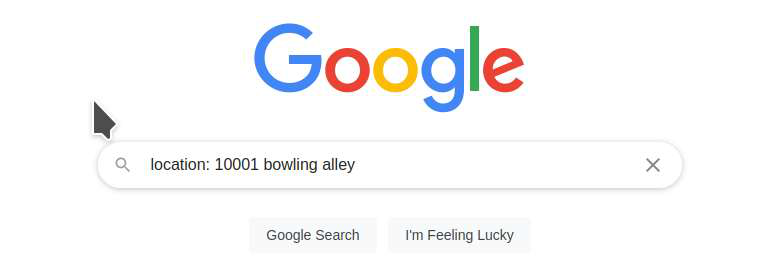
Is your input in the search in the following format??? see screenshot location: 10001 bowling alley
Toutes les réponses (6)
Try using location: in google
Ex. location: 10001 starbucks
Just change zip to city or state.
I can't find any location to change in google, it steers me to google Chrome.
What zip are you in and what are you searching for?
I can put my zipcode in the search and still it comes up with a city hundred of miles away (Atlanta, GA). Evidently my service provider is in that area and any search that includes my ip address is effected. For instance if I search for a bowling alley, or a bowling alley nearby, or in my area, I get results in Atlanta. There are some settings in Firefox that I thought have to do with that. I know an ip address can be spoofed, I don't know how or know if it's legal?
Solution choisie
Is your input in the search in the following format??? see screenshot location: 10001 bowling alley
That does work, thank you. I just wish I could do it the easy was like most people and either put no location, or use the auto fill when it adds "near me".