


Can Not Install Add-On?

I just downloaded Thunderbird , version 78. I am trying to import my Email file (Mbox) to thunderbird. So I went to install the ImportExportTools addon that is popular and mentioned in lots of tutorials.
But thunderbird says its not compatible with my version! Wont let me install it. Is there a manual way around to install it?
Or another way someone can recommend to import a Mbox file with all my emails?
Thanks
Solution choisie
Copy the file into Mail\Local Folders, delete the .mbox extension, restart TB.
Lire cette réponse dans son contexte 👍 1Toutes les réponses (10)
ImportExportTools NG has not yet been updated for 78. Help/Troubleshooting, click Open Folder to open the profile, close TB, copy the mbox into the Mail\Local Folders subfolder, restart TB, find the folder under Local Folders in the Folder Pane.
sfhowes said
ImportExportTools NG has not yet been updated for 78. Help/Troubleshooting, click Open Folder to open the profile, close TB, copy the mbox into the Mail\Local Folders subfolder, restart TB, find the folder under Local Folders in the Folder Pane.
Okay. But where is Help/Troubleshooting? Is that a button? I dont see it anywhere

(Duplicate post, see above)
Modifié le par JOEY61
Click the 3-bar icon, then Help, then Troubleshooting Information (see picture).

Okay thanks, I found it, but it did not work. I tried restarting and re-doing it a couple time, see screenshot. Nothing shows up

Modifié le par JOEY61
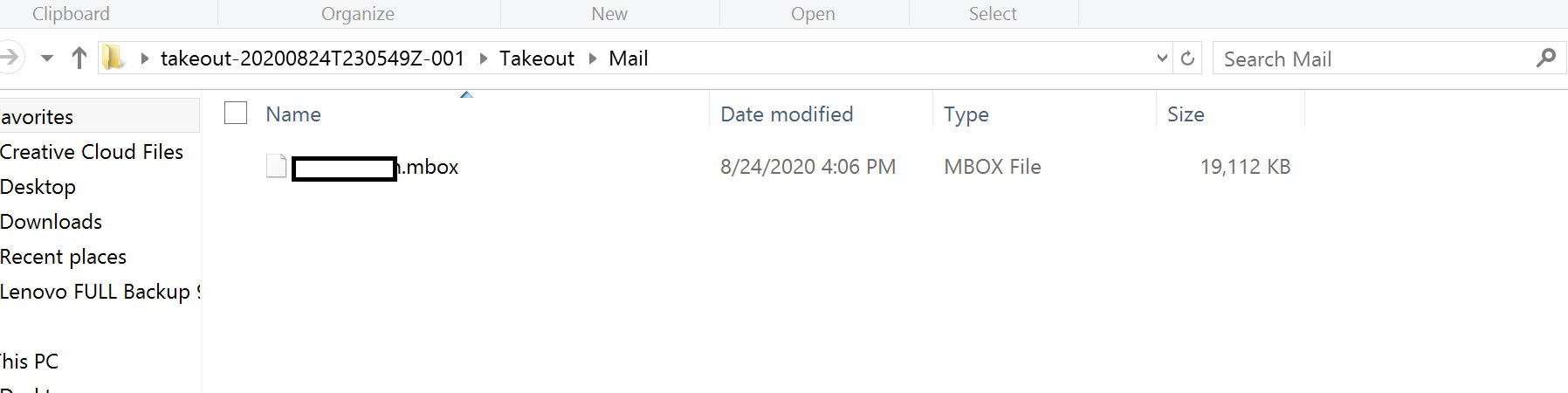
Where did you get your mbox file? If it was exported from Apple mail, the relevant mbox is inside the exported one. Also, the file should have no extension such as .mbox.
From Google account, did the Take out thing straight from my google account and downloaded my emails. That's the file it gave me, this is what it looks like:
Solution choisie
Copy the file into Mail\Local Folders, delete the .mbox extension, restart TB.
That did it! What an easy work around now that I know how to do it, now I dont need that addon really. Thanks so much! By the way, if I do that with a 10gb Mbox file, will that cause thunderbird to freeze/crash each time I start it? Or how big of an mbox file can it handle? I assume each time you open thunderbird, it manually loads that file from the computer.
Modifié le par JOEY61
A large mbox file may take a while for TB to index on the first restart, but afterwards there should be no performance issues as long as you follow the general recommendation to exclude the profile folder from antivirus scanning.