


Windows 10 reached EOS (end of support) on October 14, 2025. If you are on Windows 10, see this article.

Rechercher dans l’assistance

Évitez les escroqueries à l’assistance. Nous ne vous demanderons jamais d’appeler ou d’envoyer un SMS à un numéro de téléphone ou de partager des informations personnelles. Veuillez signaler toute activité suspecte en utilisant l’option « Signaler un abus ».

En savoir plus
Résolu Archivé

Installed Thunderbird on new PC - e-mail password is correct but can't connect

siegbrunn a répondu
siegbrunn

I am in the middle of installing everything into the new PC. Have installed Thunderbird and am trying connect (in Thunderbird's small window) to my e-mail server. Failure. After several tries I went online and opened my account direct on the server (same password), went to setting for E-Mail password and made a "new" password, but duplicating the one I've been using. Logged out online. Tried again. Failure. Tried again still logged in on the server. Failure.

I'm completely baffled. The small TB window did the configuration itself and I assume it's right. I'm trying to upload an image but it's not working, so I'll describe it.

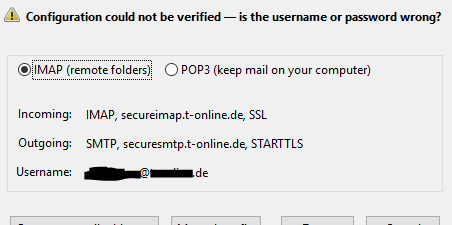
!! Configuration could not be verified -- is the username or password wrong? x IMAP (remote folders) Incoming: IMAP, secureimap.t-online.de, SSL Outgoing: SMTP, securesmtp.t-online.de,STARTTLS Username: s******@t-online.de

I'm on Win10 64b with newly downloaded TB.


HELP!

I am in the middle of installing everything into the new PC. Have installed Thunderbird and am trying connect (in Thunderbird's small window) to my e-mail server. Failure. After several tries I went online and opened my account direct on the server (same password), went to setting for E-Mail password and made a "new" password, but duplicating the one I've been using. Logged out online. Tried again. Failure. Tried again still logged in on the server. Failure. I'm completely baffled. The small TB window did the configuration itself and I assume it's right. I'm trying to upload an image but it's not working, so I'll describe it. !! Configuration could not be verified -- is the username or password wrong? x IMAP (remote folders) Incoming: IMAP, secureimap.t-online.de, SSL Outgoing: SMTP, securesmtp.t-online.de,STARTTLS Username: s******@t-online.de I'm on Win10 64b with newly downloaded TB. HELP!

Toutes les réponses (2)

Here's the pic, upload is working now.
Solution choisie

I hardly believe this, but I just took the time to bring in my old FF profile and then change profile and VOILA! the %&$#% works! I have NO idea how that is possible but I'm very happy about it.

Moderators, please remove this post if it's just wasted space.