


Can I open and review mbox file in thunderbird without creation new account there or signing in exising account?

I need to open mbox file in thunderbird without creation new account or signing in exising account. Is it possible? I just need to open and review mbox file, that's all.
Toutes les réponses (9)

Use the built-in 'Local Folders' account.
christ1 said
Use the built-in 'Local Folders' account.
How to use it? If I don't create new account left menu bar of thunderbird is empty. There is no 'Local Folders'.
There should always be at least a 'Local Folders' account.
Please post a screenshot of your folder pane. https://support.mozilla.org/kb/how-do-i-create-screenshot-my-problem
christ1 said
There should always be at least a 'Local Folders' account. Please post a screenshot of your folder pane. https://support.mozilla.org/kb/how-do-i-create-screenshot-my-problem
Here. There is no 'Local Folders' account.
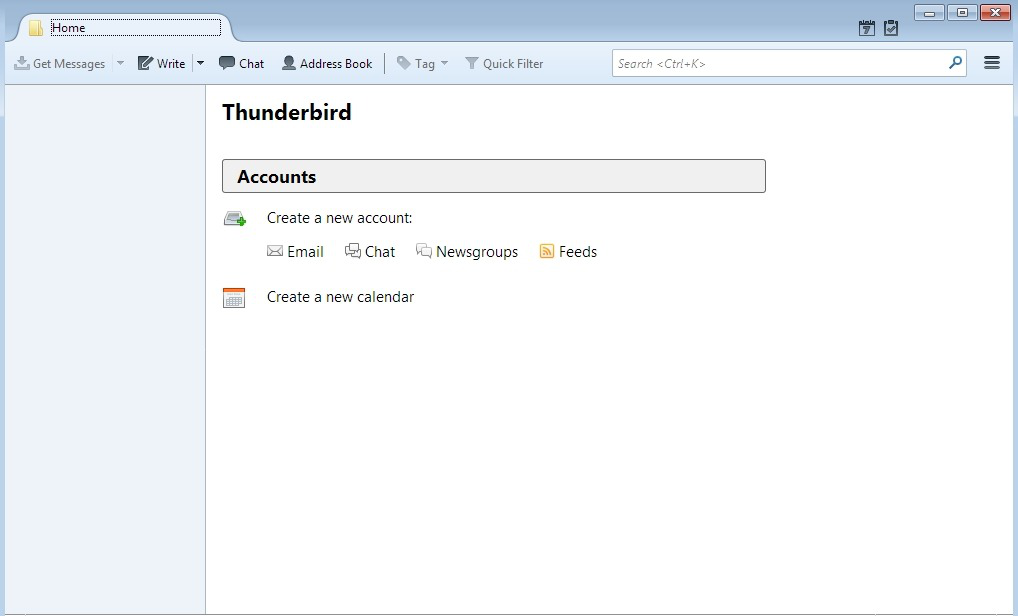
What happens if you do the following:
- click on the 'Menu icon' - 3 horizontal bars
- Choose 'New Message > 'Folder'
- 'New folder' window opens
- Give it a suitable name.
Create as a subfolder of :
- choose 'Local Folders' from drop down
- click on 'Create Folder' button
Exit and then restart Thunderbird to see if this time 'Local Folders' is displayed in the left pane with the new folder.
Toad-Hall said
What happens if you do the following:
- click on the 'Menu icon' - 3 horizontal bars
- Choose 'New Message > 'Folder'
Create as a subfolder of :
- 'New folder' window opens
- Give it a suitable name.
Exit and then restart Thunderbird to see if this time 'Local Folders' is displayed in the left pane with the new folder.
- choose 'Local Folders' from drop down
- click on 'Create Folder' button
When I do this "Choose 'New Message > 'Folder'" Nothing happens. No window appears.
What version of Thunderbird are you using?
Did you download Thunderbird from the link below?
Toad-Hall said
What version of Thunderbird are you using? Did you download Thunderbird from the link below?
I use 52.9.1
Try this: Exit Thunderbird
Locate your profile name folder - you may need to make hidden files and folders visible.
The AppData folder is folder is a hidden folder; to show hidden folders, open a Windows Explorer window and choose "Organize → Folder and Search Options → Folder Options → View (tab) → Show hidden files and folders".
navigate directly to your profile folder at the following path:
- C:\Users\<Windows user name>\AppData\Roaming\Thunderbird\Profiles\<Profile name>\
By default, the 'Profile name' folder is called 'xxxxxxx.default' where the x's are letters and numbers. open 'profile name' folder click on 'Mail' folder click on 'Local Folders' mail account to open folder. Copy your mbox file and paste it into 'Local Folders' folder. Note: mbox text files do not have any extension.
Start Thunderbird
Report back on results. Did Local Folders appear in left pane?