


How do I disable the "Undo" banner that appears whenever I close a tab

It's an annoying new "feature" that covers the next tab I want to close. I would like to disable this "feature". I'm hoping it's somewhere in "about:config"
Toutes les réponses (4)
Firefox 44 switched from using the "toast" feature of Android for the Undo Close option to using its "snackbar" feature, which should be lower on the screen, to reduce the blocking effect so you could swipe away the next tab without waiting. I have attached an example of what I see. Not sure how this looks on Android versions before Android 6.0 Marshmallow. Is this similar to yours?
The code uses the "short" display length defined in Android for the period of time to show the notification, which seems to be about 1.5 to 2 seconds. Firefox could be changed in a future version to specify a fixed amount of time (in milliseconds), and that would open the possibility of an about:config preference to lower the time to 0 milliseconds. But I'm getting ahead of the current situation: I don't see anything like that now.
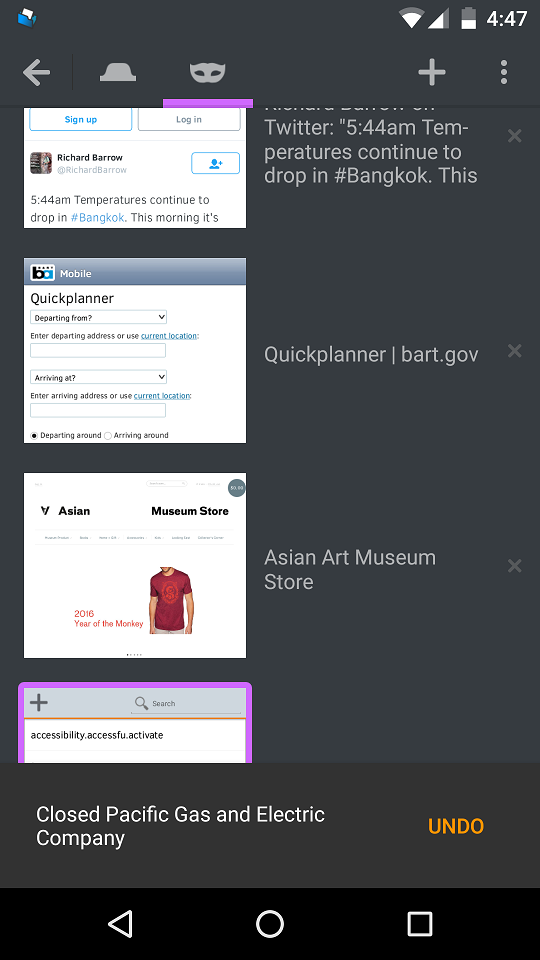
Yep! That's the "feature" all right. I don't know why they thought this annoying banner was a good idea. They should have an "Undo Last TAB" menu item instead.
I can hardly wait for a 0 ms option ...
(Lollipop 5.1.1)
You can re-open closed tabs from one of the sliding panels on the home screen, all the way to the left on mine.
To give input on changes you would like to see in future versions, you can use this site:
https://input.mozilla.org/feedback
That page lets you choose Android, so I think you can submit the suggestion from a desktop version of Firefox if that's more convenient.