


Locking Firefox settings

Hello Everybody,
i have a small problem blocking the settings on Firefox 38.0.1. I've created 3 files: 1. override.ini => placed on "%ProgramFiles(x86)%\Mozilla Firefox\browser\
[XRE] EnableProfileMigrator=false
2. local-settings.js => placed on "%ProgramFiles(x86)%\Mozilla Firefox\defaults\pref\
pref("general.config.filename", "mozilla.cfg"); pref("general.config.obscure_value", 0); pref("browser.rights.3.shown", true);
3. mozilla.cfg => placed on %ProgramFiles(x86)%\Mozilla Firefox\, the same place as firefox.exe
//Firefox Default Settings // set Firefox Default homepage lockPref("browser.startup.homepage","http://www.google.com");
// disable default browser check pref("browser.shell.checkDefaultBrowser", false); pref("browser.startup.homepage_override.mstone", "ignore");
// disable application updates pref("app.update.enabled", false)
// disables the 'know your rights' button from displaying on first run pref("browser.rights.3.shown", true);
// disables the request to send performance data from displaying pref("toolkit.telemetry.prompted", 2); pref("toolkit.telemetry.rejected", true);
// set a default proxy settings HTTP lockPref("network.proxy.http";10.1.1.1); lockPref("network.proxy.http_port";8080); lockPref("network.proxy.type", 1); lockPref("network.proxy.no_proxies_on", "localhost, 127.0.0.1"); lockPref("network.proxy.share_proxy_settings", true);
But the user still can change the settings. Maybe i'm doing something wrong. Any help is appreciated. Thanks in advanced.
Modifié le par karchoker
Toutes les réponses (4)
Solution choisie
hello, you'll have to be exact with punctuation, since each mistake will cause the whole configuration to fail...
// set Firefox Default homepage lockPref("browser.startup.homepage","http://www.google.com");
// disable default browser check pref("browser.shell.checkDefaultBrowser", false); pref("browser.startup.homepage_override.mstone", "ignore");
// disable application updates pref("app.update.enabled", false);
// disables the 'know your rights' button from displaying on first run pref("browser.rights.3.shown", true);
// disables the request to send performance data from displaying pref("toolkit.telemetry.prompted", 2); pref("toolkit.telemetry.rejected", true);
// set a default proxy settings HTTP lockPref("network.proxy.http", "10.1.1.1"); lockPref("network.proxy.http_port",8080); lockPref("network.proxy.type", 1); lockPref("network.proxy.no_proxies_on", "localhost, 127.0.0.1"); lockPref("network.proxy.share_proxy_settings", true);
Hello philipp,
Thanks for your answer. Yes is like i have it, i don't know why when i put my question the editor mess all the code, check the screenshot.
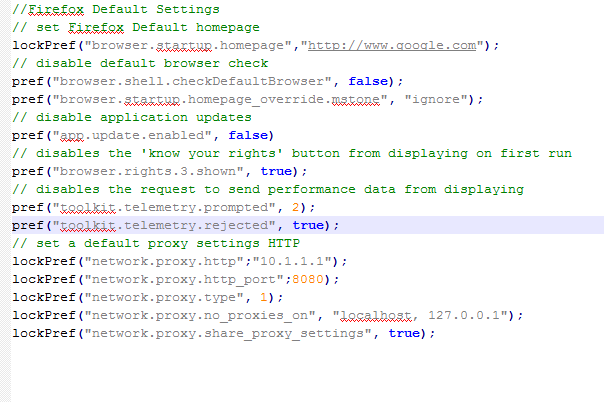
there's a semicolon missing at the end of the first line i've highlighted & there have to be colons instead of semicolons in the other two.
Hi philipp,
Was my fault, thanks for your help. i really appreciate.