


connection untrusted

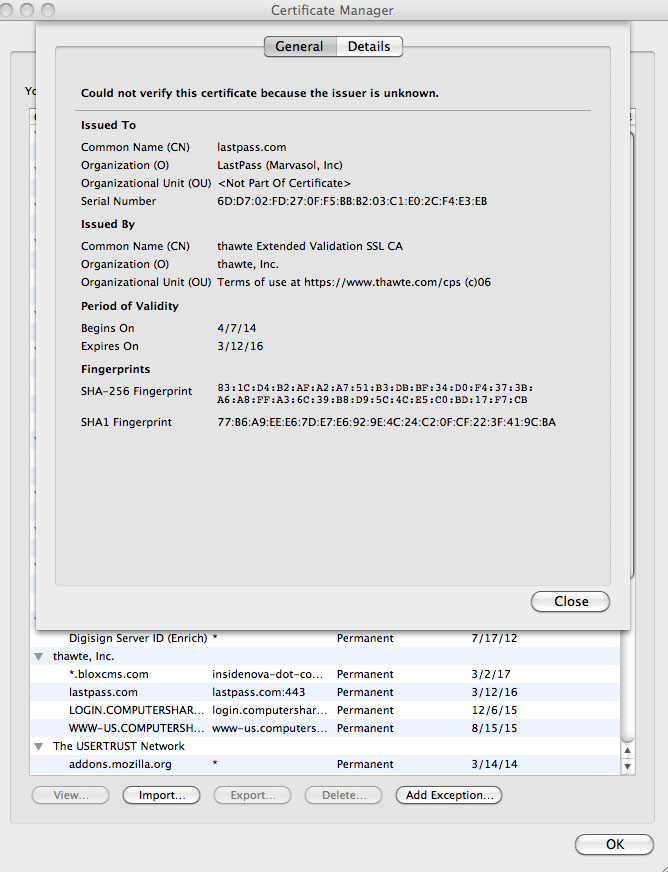
A few days ago I was no longer able to log in to my LastPass vault. It said there was a connection error. I went to lastpass.com and got a message, "This Connection is Untrusted". Because it's an https it won't allow me to add an exception. LastPass technical support has basically given up in trying to find a solution. I went to the certificate manager on my Mac 10.6.8, added an exception and it still won't go to the site. I'm using LastPass on two other browsers with no problem. Firefox is my go to browser, but if I can't get LastPass to work and not able to get to their site, I may have to give up on using Firefox. I've attached two screen shots of the message and the certificate manager

Solution choisie
Thanks to cor-el and Sriram Sk. cor-el directed me to the Troubleshooting Information. I didn't follow the rest of his advice. Instead I found the Refresh Firefox which fixed the problem. Still don't understand why just the one https for LastPass was a problem. I went to other https sites and had no issue.
Lire cette réponse dans son contexte 👍 0Toutes les réponses (5)
Do you have your system clock set correctly? It is mostly overlooked when getting an expired certificate warning. As for the unformatted pages, try clearing your firefox's cache and reload those pages.
Try to rename the cert8.db file (cert8.db.old) and delete the cert_override.txt file in the Firefox profile folder to remove intermediate certificates and exceptions that Firefox has stored.
You can use this button to go to the currently used Firefox profile folder:
- Help > Troubleshooting Information > Profile Directory: Show Folder (Linux: Open Directory; Mac: Show in Finder)
- http://kb.mozillazine.org/Profile_folder_-_Firefox
If that has helped to solve the problem then you can remove the renamed cert8.db.old file. Otherwise you can rename (or copy) the cert8.db.old file to cert8.db to restore the previously stored intermediate certificates. Firefox will automatically store intermediate certificates when you visit websites that send such a certificate.
If that didn't help then remove or rename secmod.db (secmod.db.old) as well.
Phasing out Certificates with 1024-bit RSA Keys: https://blog.mozilla.org/security/2014/09/08/phasing-out-certificates-with-1024-bit-rsa-keys/ Phase 2: Phasing out Certificates with 1024-bit RSA Keys: https://blog.mozilla.org/security/2015/01/28/phase-2-phasing-out-certificates-with-1024-bit-rsa-keys/
Sriram Sk said
Do you have your system clock set correctly? It is mostly overlooked when getting an expired certificate warning. As for the unformatted pages, try clearing your firefox's cache and reload those pages.
Thank you for the response. The clock is fine. However, following another person's solution I found my way to the Refresh Firefox button which did the trick.
cor-el said
Try to rename the cert8.db file (cert8.db.old) and delete the cert_override.txt file in the Firefox profile folder to remove intermediate certificates and exceptions that Firefox has stored. You can use this button to go to the currently used Firefox profile folder:If that has helped to solve the problem then you can remove the renamed cert8.db.old file. Otherwise you can rename (or copy) the cert8.db.old file to cert8.db to restore the previously stored intermediate certificates. Firefox will automatically store intermediate certificates when you visit websites that send such a certificate. If that didn't help then remove or rename secmod.db (secmod.db.old) as well.
- Help > Troubleshooting Information > Profile Directory: Show Folder (Linux: Open Directory; Mac: Show in Finder)
- http://kb.mozillazine.org/Profile_folder_-_Firefox
Phasing out Certificates with 1024-bit RSA Keys: https://blog.mozilla.org/security/2014/09/08/phasing-out-certificates-with-1024-bit-rsa-keys/ Phase 2: Phasing out Certificates with 1024-bit RSA Keys: https://blog.mozilla.org/security/2015/01/28/phase-2-phasing-out-certificates-with-1024-bit-rsa-keys/
Thank you for the response. The solution you offered was a bit beyond me. However, it did set me on the path in finding the Refresh Firefox button which did the trick.
Solution choisie
Thanks to cor-el and Sriram Sk. cor-el directed me to the Troubleshooting Information. I didn't follow the rest of his advice. Instead I found the Refresh Firefox which fixed the problem. Still don't understand why just the one https for LastPass was a problem. I went to other https sites and had no issue.