


Why is a fake name randomly attached to my outgoing emails using Thunderbird?!?! WTF

Hello:
Random people with various email accounts & providers (gmail, Apple, Boost, etc.) are asking me: Who is "Jimmy James?" (not even close to a name I have or have ever used).
This problem does seem to be isolated among people using their smartphones who receive these "fake name" emails, so there is that.
Here's what I've tried to address this issue so far, no luck:
- I have reviewed the different account names via my Thunderbird account - this name is not one of them.
- I have contacted my hosting service (Dreamhost.com), they claim no responsibility from within their server.
Any help or suggestions are welcome but please remember: I have limited skills with digging into IPOP, IMAP etc. issues so explain things very simply please! I can also be emailed directly at: contact@rrkfilms.com
Thank You
M Larkin
Toutes les réponses (7)
What is the content of the emails?
If it's obviously SPAM, the email sender information is most likely forged. This is called Email spoofing, and is unfortunately quite common.
Can you share the headers of one such email?
thanks for the response, to clarify:
The problem emails are legitimate & being sent by me (they are not spam). However, some recipients using smartphones to get my emails are telling me the user name attached those emails is "Jimmy James" . That is not me, I've never used that name, no clue why it would show that.
Again, this doesn't always happen, it is random.
frustrating!
Can you share the headers of one such email?
My email address is contact@rrkfilms.com; the attached name SHOULD be RRK Films, LLC.
Here is a screen shot from a pal who pointed out the random name coming from me is "Jimmy James". FYI I have never used this name for any of my Thunderbird accounts, have already checked the "manage identities" section in Thunderbird, etc.
And my hosting company denies any responsibility for this problem.
thanks & let me know any suggestions to fix this
chef
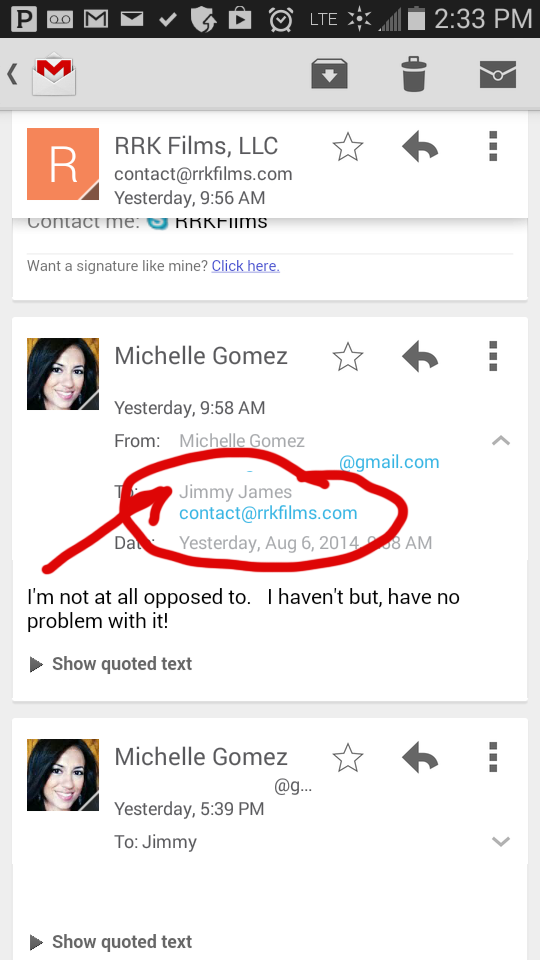
Could you ask this person to look up in their address book if there is a "Jimmy James" contact and have them remove it?
The screenshot is from an Android device, I am really looking for the email full headers as it was sent from your computer. In your Sent folder, while viewing a message, pressing Ctrl-U will show its source (and headers) which you can then copy & paste here.
Could you ask this person to look up in their address book if there is a "Jimmy James" contact and have them remove it?"
This suggestion is not helpful and does nothing to address the problem. As mentioned in the first post, this fake name is showing up randomly with more than one recipient, which means it is will also be going out to new/unknown parties.
Well, your screenshot shows a Gmail user with the "Jimmy James" contact in the "To:" field (so they're the recipient). This is an indicator that email address has been added to the GMail account (or the phone's) address book.
This is not a problem in Tunderbird the way you are presenting it, including the supporting screenshots.
If you can't share the email headers of one of your sent messages, I am afraid I am out of ideas here. Another option would be to send me one email directly, you can use magicfab@gmail.com which is an account I use for testing purposes.