


Screen turns black then crash

Occasionally when I go to webpages the entire page will turn black. This most often occurs when scrolling, but can also happen when loading a page or even randomly. Usually, but not always, more scrolling fixes it. shortly after getting these problems Firefox will often crash.
Solution choisie
Your crash reports all have different signatures but the System Memory Use Percentage in the crash reports is rather high, so this could be out-of-memory crashes.
See also:
- Prevent Out Of Virtual Memory Crashes: https://addons.mozilla.org/firefox/addon/prevent-out-of-virtual-memo/
Toutes les réponses (9)

You said that Firefox is crashing. Please follow the steps below to provide us crash IDs to help us learn more about your crash.
- Enter about:crashes in the Firefox address bar and press Enter. A Submitted Crash Reports list will appear, similar to the one shown below.
- Copy the 5 most recent Report IDs that start with bp- and then go back to your forum question and paste that into the "Post a Reply" box.
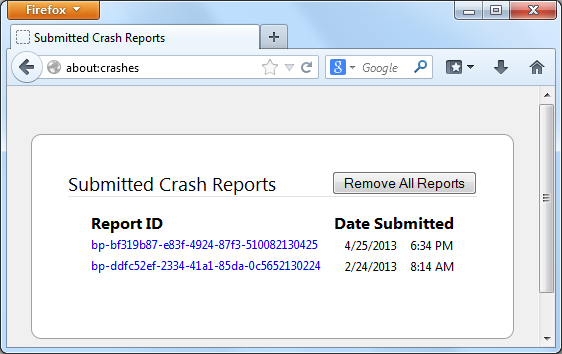
Thank you for your help!
More information and further troubleshooting steps can be found in the Troubleshoot Firefox crashes (closing or quitting unexpectedly) article.
This may also be caused by add block plus. After you paste the crash reports we can take a look further as well. Thank you.
Having this issue too. Most recently I was reading wikipedia and I thought that page caused the issue but when I switchd tabs it was happening there too. I dont crash though. The issue disappaered after a few minutes but it happens several times a day
bp-6001f599-8eaf-43c2-a959-5e7962140515 5/14/2014 7:34 PM
bp-d0a915ff-2151-4f05-b6d7-1ae792140514 5/13/2014 9:28 PM
bp-4bc5588c-1d4e-4a63-a088-9bc4c2140513 5/12/2014 7:50 PM
bp-afac4dbf-5928-459b-abbb-265462140511 5/11/2014 11:38 AM
bp-f5c726b3-0988-4026-881b-848122140507 5/6/2014 8:48 PM
Modifié le par cor-el

Solution choisie
Your crash reports all have different signatures but the System Memory Use Percentage in the crash reports is rather high, so this could be out-of-memory crashes.
See also:
- Prevent Out Of Virtual Memory Crashes: https://addons.mozilla.org/firefox/addon/prevent-out-of-virtual-memo/
That would probably because I have a bad habit of not closing tabs... I have maybe 600 open right now, although tabs don't load until they are selected Firefox is currently using 2.5GB of RAM. I should get to closing them...
Do you have AdBlock? That could be the problem...
http://www.ghacks.net/2014/05/14/firefox-using-lots-memory-adblock-plus-may-reason/
quadrplax
Oh, man...:P Did it help when you closed down some of those tabs, maybe 300? Geez, how do you get that high number of tabs? I can barely do 10
I was going to submit a crash report but the latest ones showing up are from April despite it actually crashing like 4 times this month