


How to make a cookie exception for startpage ?

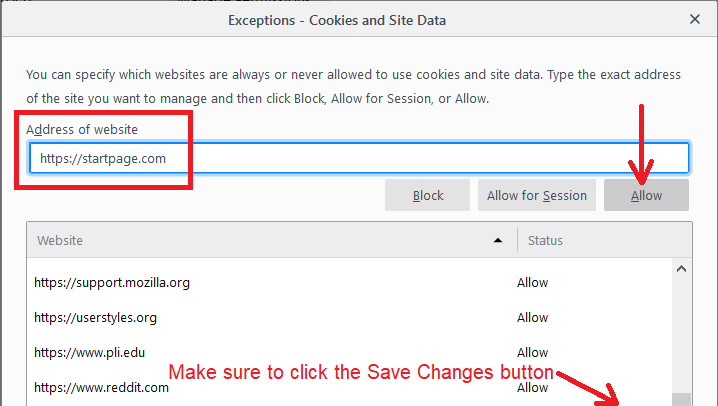
I've set my Firefox so that it clears all cookie when ended but i want to make the startpage cookie an exception so that i can save my startpage setting.
Kaikki vastaukset (3)
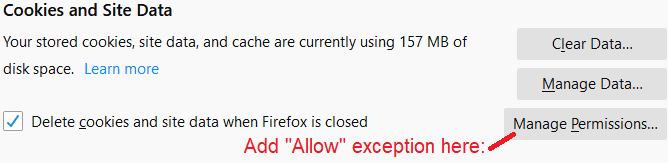
Hi sandraman, Firefox has two relevant settings on the Preferences page, Privacy & Security panel:
(1) Switch Firefox from accepting all requests for persistent cookies to only setting persistent cookies for sites on your Exceptions list (all other cookies are converted to session-only cookies).

(2) Set Firefox to clear all cookies when it closes, without exception.

Since #2 is not compatible with exceptions, you can rely on #1 instead.
Note that there appears to be a bug in Firefox 67 related to having both #1 and #2: a custom home page is shown as blank (not loaded). Hopefully that will get fixed in the next couple of weeks.
Edit: updated first image
Muokattu , muokkaaja jscher2000 - Support Volunteer
Valittu ratkaisu
That first screenshot didn't include the Manage Permissions button where you enter the exception. Sorry about that. The format is:
Thank you. Now Firefox and startpage are set properly.