


The requested service is temporarily unavailable

Using my PC, I am clicking on this URL: https://schoolgateway.westminster.org.uk/?page_id=7. Firefox responds with "The requested service is temporarily unavailable. It is either overloaded or under maintenance. Please try later." Every time. Using Firefox for Android on my phone: same result. I have tried Troubleshoot Mode on my PC: same result. And yet Safari, Chrome, Edge and Brave all load the web page correctly with no error message.
What am I doing wrong?
Valgt løsning
The website works for me via an open HTTP connection, so try to create an "off" exception for HTTPS-Only Mode via "Settings -> Privacy & Security -> HTTPS-Only Mode -> Manage Exceptions".
Læs dette svar i sammenhæng 👍 0
Alle svar (7)

I get the same result. I have tried adding the domain to the following preference in about:config to no effect. network.trr.excluded-domains The following are FYI only as they don't seem to be relevant.
https://wiki.mozilla.org/Trusted_Recursive_Resolver#DNS-over-HTTPS_Prefs_in_Firefox https://support.mozilla.org/en-US/kb/firefox-dns-over-https https://support.mozilla.org/en-US/kb/dns-over-https-doh-faqs
See also https://support.mozilla.org/en-US/kb/firefox-cant-load-websites-other-browsers-can
Ændret af Terry den
Valgt løsning
The website works for me via an open HTTP connection, so try to create an "off" exception for HTTPS-Only Mode via "Settings -> Privacy & Security -> HTTPS-Only Mode -> Manage Exceptions".
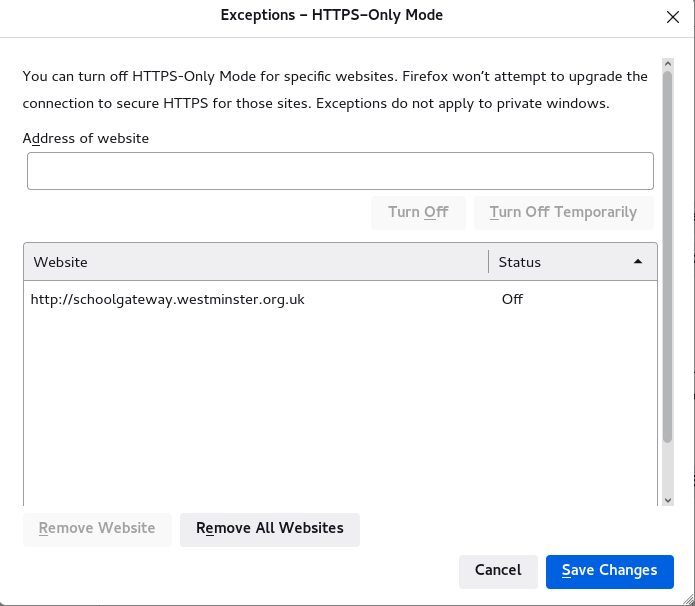
Ændret af cor-el den
Thank you, Terry.
Cor-el: thank you. I also found that the problem went away when I turned off HTTPS-only mode altogether, so this feature is clearly the problem.
Note that exceptions do not work in Private Browsing mode and in PB mode the only option is to disable HTTPS-Only Mode entirely as far a I managed to get it working in PB mode.
Cor-el: thank you again, much appreciated. However, I do not think that work-arounds are good enough here. Firefox is saying that the website is unavailable, which it isn't. It should be saying that the website does not offer a safe connection via HTTPS and should allow the user to proceed if he or she wishes. It is clearly a bug, and I have now reported it via Bugzilla.
For reference:
- 1821012 - "requested service is temporarily unavailable" message in HTTPS-only mode
This is a problem with how the server responds to a secure connection. If there is a response then Firefox assumes the HTTPS is supported.