


Where icons of added search engines are stored?

In what file does Firefox store information about the icons of added search engines?
(After copying the profile with the search.json.mozlz4 file, search engines added by the user work correctly, but their icons cannot be seen - each search engine is marked with the same icon 'magnifier' - as you can see in the attachment.)
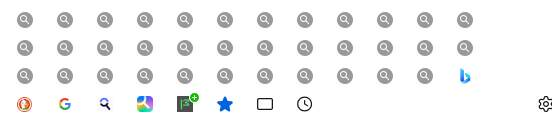
Zvolené řešení
It seems that the source file search.json.mozlz4 that I copied was broken.
I used another file search.json.mozlz4 (from Firefox installed on a laptop and not used for a year) and everything is fine here (all icons are visible and all search engines work).
Thank you for your help :)
Všechny odpovědi (4)
How were they added?
When I look at the extracted JSON from search.json.mozlz4 using my page at https://www.jeffersonscher.com/ffu/searchjson.html, I can see "_iconMapObj" properties that have encoded image data but also ones that point to an extension file its local UUID (moz-extension://) address. Local UUIDs are randomly assigned, so even if you install the same extensions in the new profile, the old UUIDs may be useless. If that's the problem, hmm, I'm not sure how to clean them up.
Search engines were added either directly in the Fifefox settings or via the add-on 'Add Custom Search Engine'. On your page I can see that there are definitions of icons in the search.json.mozlz4 file ( for example: "_iconMapObj":{"16":"data:image/x-icon;base64,AAABAAEAEBAAAAEAIABoBAAAFgAAA ... ) However, no search engine icon is visible (although search engines work).
If the data is in the file, I don't know why Firefox isn't using it.
Zvolené řešení
It seems that the source file search.json.mozlz4 that I copied was broken.
I used another file search.json.mozlz4 (from Firefox installed on a laptop and not used for a year) and everything is fine here (all icons are visible and all search engines work).
Thank you for your help :)