


How do I stop the automatic syncronization of a paticular folder?

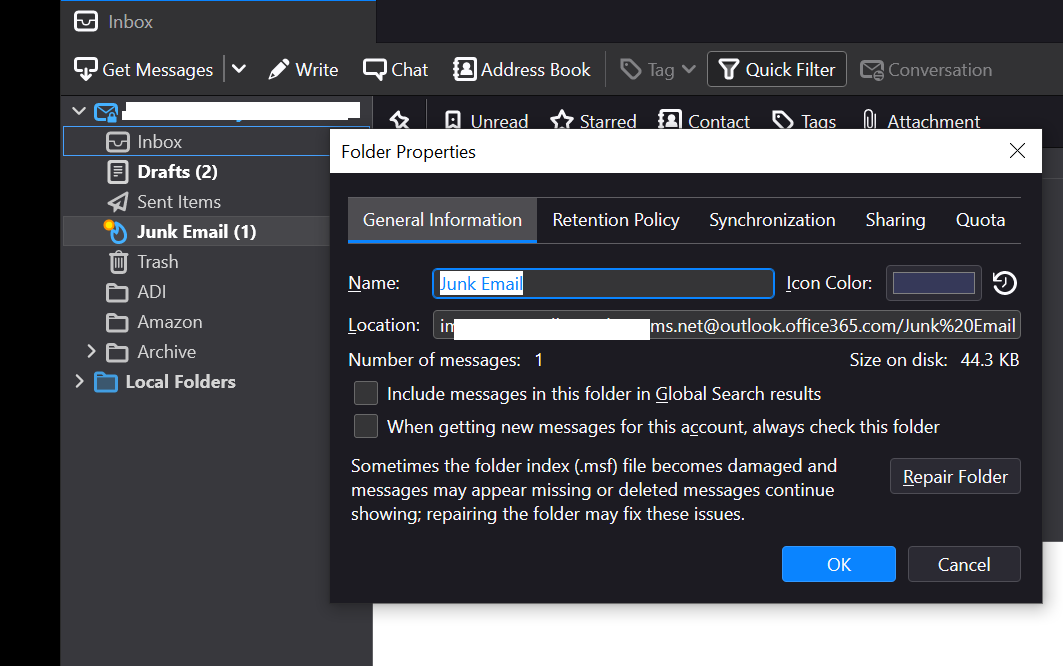
I don't like the notification icon appearing by the junk email folder because I don't like being reminded of junk mail, but want to be able to check the folder every now and then to see if I was missing something. I have the second checkbox in this screen disabled, so one would think that would turn off the synchronization, but it doesn't.
Interestingly, I have two user created folders called "ADI" and "Amazon" which after checking that option, the notification icon for those folders appears when new emails are received. Why am I still receiving notifications for this folder in this case?
Všechny odpovědi (1)
I figured out the problem. This setting only changes the sync preference on startup and when manual sync is activated. It has no effect on notifications for folders when email is received when thunderbird is opened. So with this setting unchecked, I still get notified when mail is received in that folder when thunderbird is running, but not when the email was delivered prior to the client being opened.
Still not ideal but I guess it works.