Cannot select Local Folders after update to 115

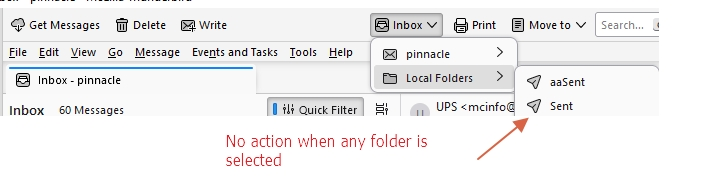
After an automatic upgrade to Version 115, I cannot select any Local Folders. The "Switch To Folder" box is present on the menu bar. With the "Inbox" icon showing and then selecting the the down arrow, all my Local Folders are shown. Selecting any one of them results in the list going away and with no action (ie the folder is not shown). I have reset toolbars and controls in the troubleshooting < Troubleshoot Mode buttons with no effect after then adding back the "Switch to Folder" icon. My Local Folders are located here: C:\Users\Doug\AppData\Roaming\Thunderbird\Profiles\65psm7ws.default\Mail\Local Folders. That location has my Local Folders and the contents of those files seem to have the data I'm looking for. If I click on one, the appropriate email is shown.
What to do??
Thanks for any help.
Doug
Všechny odpovědi (2)
So I'm able to see the Local Folders now by dragging the left side of the window to the right. But the icon in the menu bar that shows which folder I'm in still doesn't do anything. When I select a folder on the left side, the icon changes to show I'm in that folder, but using the drop down menu within that menu does nothing when I try to select another folder (although it does show the folders).
The drop down menu still doesn't work. Opening the folder panel on the left and then closing it is a pain.
Any thoughts?