


Firefox Snap launches 'open with' error boxes when user/firefox account clicked.
I am having an issue with Firefox snap on Lubuntu 22.10.
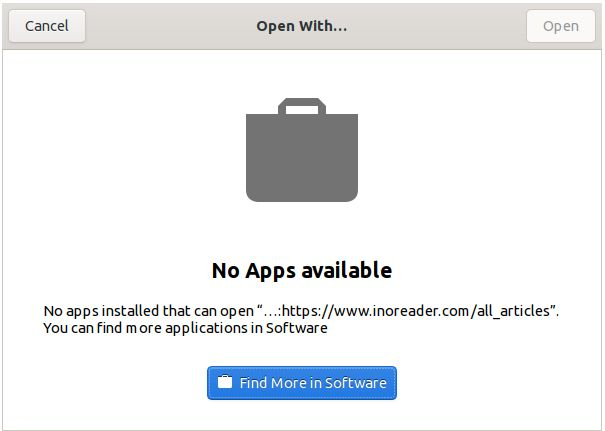
When I click on the Firefox account user image in the toolbar two error boxes open each time. I have attached an image of the error box.
Any ideas on where I could start with this?
Zvolené řešení
Finally, think I have got to the bottom of this.
Looks like the solution (for me) is heading into 'settings' in Firefox. In the General tab, scroll down to the Applications. One entry is for fake-favicon-uri. That needed to be linked to;
/home/[USER]/.mozilla/firefox/[XXX].default-release/favicons.sqlite
The problem now seems to be solved.
Všechny odpovědi (4)

Try posting your issue here. ---> https://forum.snapcraft.io/categories
Do you have the same issue with Firefox from Mozilla? Looks like a Distro / Snap issue.
I uninstalled Snap package (snapd entirely) actually, then tried the Flatpak version. The issue happened again with the Flatpak. Clicking the user account launches multiples of that message. Sometime up to a dozen.
What I have done is followed the instructions here: How to Install Firefox as a .Deb on Ubuntu 22.04 (Not a Snap) and Firefox is working like it used to now.
Definitely a weird issue, have not seen before, and seems limited to Flatpak/Snap. Downloading the tar direct from Firebox works fine too. But it's a nightmare to integrate that into Lubuntu menu's.
Upravil uživatel Keith dne
[Accidentally duplicated previous post]
Upravil uživatel Keith dne
Zvolené řešení
Finally, think I have got to the bottom of this.
Looks like the solution (for me) is heading into 'settings' in Firefox. In the General tab, scroll down to the Applications. One entry is for fake-favicon-uri. That needed to be linked to;
/home/[USER]/.mozilla/firefox/[XXX].default-release/favicons.sqlite
The problem now seems to be solved.