


Copy contacts/addresses from CardBook?

Hi all. When I right click a contact in CardBook, and click "copy" (or press ctrl+c), I don't seem to be able to paste that content anywhere outside the CardBook environment. (I ran into this problem when I wanted to add some additional contacts to an email I was writing to a category of contacts (within Thunderbird), but I can imagine I might want to copy and paste addresses outside Thunderbird as well?)
Zvolené řešení
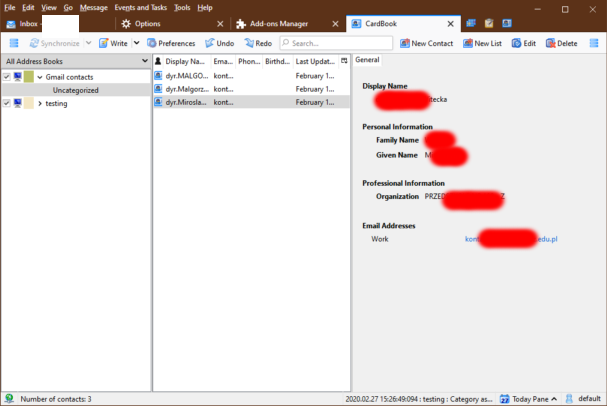
In the attached picture you can see the General pane that shows contact details and the Email addresses. It's similar to the Contact Pane in the TB Address Book. But it's easy to hide, and not so easy to unhide. Place your cursor at the right side until it turns into a double-arrow, then click and drag to the left until the pane appears.
Všechny odpovědi (5)
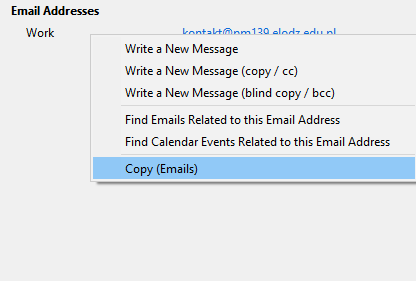
I think the only way is to right-click the address in the General, right, pane when a contact is selected, and Copy (Emails); see picture.
Thanks for your answer! But I am afraid I don't know what you mean with "general, right pane". My Cardbook does have a normal list of contacts, and when I right click on one of these contacts I seem to get a different (but partly similar?) menu? (See attachment).
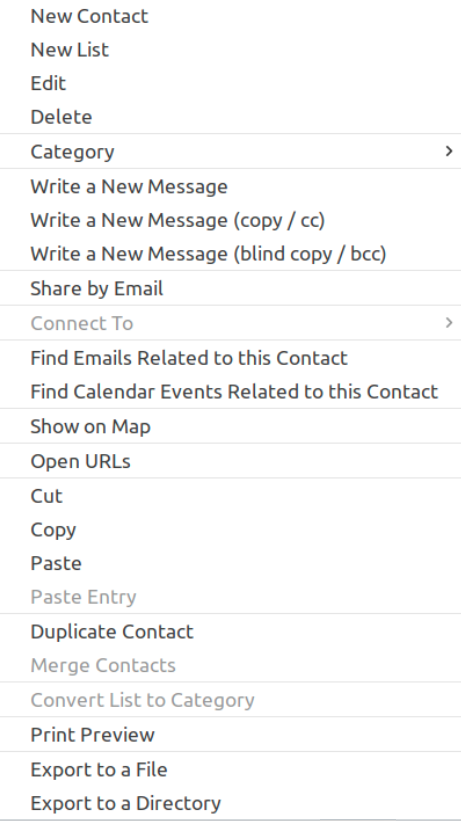
(I am running Thunderbird 68.4.1 (64-bit) on Ubuntu 19.10 by the way).
Zvolené řešení
In the attached picture you can see the General pane that shows contact details and the Email addresses. It's similar to the Contact Pane in the TB Address Book. But it's easy to hide, and not so easy to unhide. Place your cursor at the right side until it turns into a double-arrow, then click and drag to the left until the pane appears.
Ah yes, that was it. Thanks!
It would still be nice if I could just copy a batch of email-addresses from the list of contacts in the middle though.
But I guess I should just learn more programming and join the development team. Instead of complaining ;)