


Problems changing POP to IMAP

Hello, I followed the instructions to "Switch from POP to IMAP account" but I have a some concerns about the result. After activation of the new account, only "Inbox" and "Trash" folders were created on the client. Then I followed the instructions to Subscribe all the missing folders and first time I subscribed all of them. Then I noticed that there were two "Trash" folders, but only one of them was synchronized with the server. So I unsubscribed the Trash folder that was not synchronized. Is it correct? What is this second Trash Folder? Looking at the folder structure that has just been created for the new IMAP account on the client , I noticed that all the special folders (Sent, Draft, Spam, Trash) are contained in the Inbox folder, whilst for the old POP3 account (and two additional POP3 accounts) they were at the same level of Inbox. Is this the normal expected behavior for an IMAP account? I attached a picture with the folder structures. Thank you in advance.
Všechny odpovědi (2)
Sorry, image attached here.
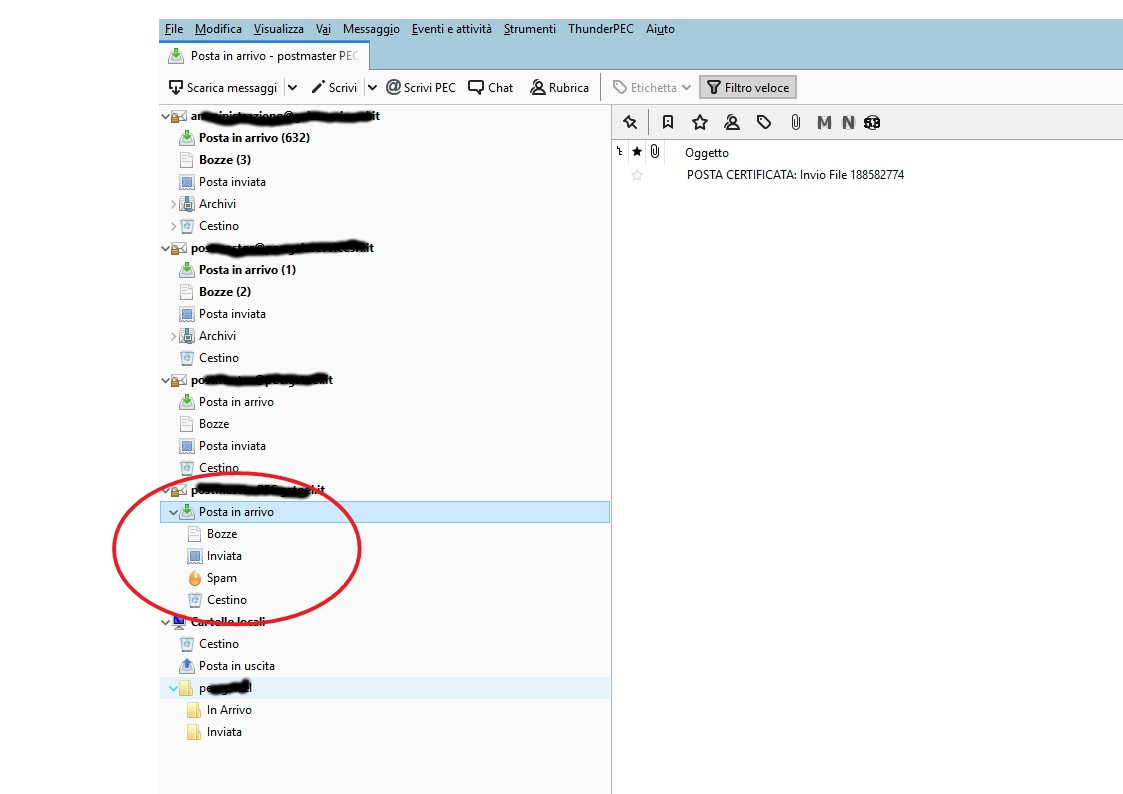
Hi Sfhowes, thank you very much for your reply. I will have some days off, so I will try ito check it next week. Any idea about the duplicated folders? On a different user account, in addition to "Trash", also "Sent" and "Draf" folders were duplicated and their twins had Italian names ("Bozze", "Inviati", "Cestino"). Yes I am in Italy, but the language set in Thunderbird is English and all the special folders on the server are named in English too. So, all in all, it seems quite strange to me.