


Windows 10 reached EOS (end of support) on October 14, 2025. If you are on Windows 10, see this article.

Prohledat stránky podpory

Vyhněte se podvodům. Za účelem poskytnutí podpory vás nikdy nežádáme, abyste zavolali nebo poslali SMS na nějaké telefonní číslo nebo abyste sdělili své osobní údaje. Jakékoliv podezřelé chování nám prosím nahlaste pomocí odkazu „Nahlásit zneužití“.

Zjistit více
Archivováno

Thunderbird won't connect to hotmail account

Andrew S Hatton odpověděl(a)
wvn1980

I am not able to add hotmail account to thunderbird. I have the latest thunderbird version I have turned on pop in hotmail pop settings as explained here: https://support.mozilla.org/en-US/questions/1120891?fpa=1 In your hotmail/outlook account (web) go to settings (the "wheel" right above), click "options" and under Accounts go to POP and IMAP settings. Under POP select that apps and devices may use POP.

On this url you can enable pop: https://outlook.live.com/owa/?realm=outlook.com&path=/options/popandimap

I use the right settings but no luck adding the account:

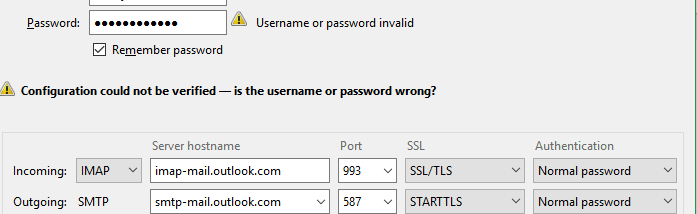
  IMAP server name imap-mail.outlook.com
   IMAP port 993
   IMAP encryption method TLS
   POP server name pop-mail.outlook.com
   POP port 995
   POP encryption method TLS
   SMTP server name smtp-mail.outlook.com
   SMTP port 587
   SMTP encryption method STARTTLS
I am not able to add hotmail account to thunderbird. I have the latest thunderbird version I have turned on pop in hotmail pop settings as explained here: https://support.mozilla.org/en-US/questions/1120891?fpa=1 In your hotmail/outlook account (web) go to settings (the "wheel" right above), click "options" and under Accounts go to POP and IMAP settings. Under POP select that apps and devices may use POP. On this url you can enable pop: https://outlook.live.com/owa/?realm=outlook.com&path=/options/popandimap I use the right settings but no luck adding the account: IMAP server name imap-mail.outlook.com IMAP port 993 IMAP encryption method TLS POP server name pop-mail.outlook.com POP port 995 POP encryption method TLS SMTP server name smtp-mail.outlook.com SMTP port 587 SMTP encryption method STARTTLS

Všechny odpovědi (2)

My problem is exactly the same BUT I am trying to use IMAP settings

I have ensured email address and password are accurate by using same settings to login via Outlook website.

Does my enquiry belong in this thread please?
I missed that - thanks - I am not sure I have that programme - but plan to investigate when I have more time