


Why are some images displayed as small rectangles with numbers?

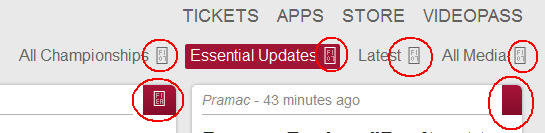
When I visit some sites, some of the images render as small rectangles with letters & numbers inside. This issue seems to be with Firefox (see motogp.com_FireFox.jpg, attached), rather than the site because the site displays fine when I access it a different browser, such as SeaMonkey (see motogp.com_SeaMonkey.jpg, attached).
The site, motogp.com is one I frequently visit; it happens on this site. Please refer to the 2 attached images for an example of this issue.

Zvolené řešení
The box identifies a character missing from the font that Firefox is using. Usually this occurs when a site has switched from using images for its icons to use characters in a custom font that you need to download. There are three common reasons for the glitch:
(1) Unchecking the "Allow pages to choose their own fonts" checkbox here:
"3-bar" menu button (or Tools menu) > Options > Content > "Advanced" button
If pages aren't allowed to specify their own fonts, Firefox will use the font you specify here, which normally doesn't have the required pictures.
(2) Disabling font downloading. To check on that:
(A) In a new tab, type or paste about:config in the address bar and press Enter. Click the button promising to be careful.
(B) In the search box above the list, type or paste gfx and pause while the list is filtered
(C) If the gfx.downloadable_fonts.enabled preference is bolded and user set to false, double-click it to restore the default value of true
(3) Extension blocking the download. NoScript has a feature to block downloadable fonts, for example.
Přečíst dotaz v kontextu 👍 2Všechny odpovědi (6)
This has happened in the past with other Firewalls/Antiviruses please temporarily disable Norton and see if this improves. Also please make sure that all extensions and add ons are up to date.
Zvolené řešení
The box identifies a character missing from the font that Firefox is using. Usually this occurs when a site has switched from using images for its icons to use characters in a custom font that you need to download. There are three common reasons for the glitch:
(1) Unchecking the "Allow pages to choose their own fonts" checkbox here:
"3-bar" menu button (or Tools menu) > Options > Content > "Advanced" button
If pages aren't allowed to specify their own fonts, Firefox will use the font you specify here, which normally doesn't have the required pictures.
(2) Disabling font downloading. To check on that:
(A) In a new tab, type or paste about:config in the address bar and press Enter. Click the button promising to be careful.
(B) In the search box above the list, type or paste gfx and pause while the list is filtered
(C) If the gfx.downloadable_fonts.enabled preference is bolded and user set to false, double-click it to restore the default value of true
(3) Extension blocking the download. NoScript has a feature to block downloadable fonts, for example.
If you use extensions (Firefox/Tools > Add-ons > Extensions) that can block content (e.g. Adblock Plus, NoScript, Flash Block, Ghostery) then make sure that such extensions aren't blocking content.
guigs2 said
This has happened in the past with other Firewalls/Antiviruses please temporarily disable Norton and see if this improves. Also please make sure that all extensions and add ons are up to date.
Thanks, guigs2, but this didn't help; appreciate the attempt, tho. - peace..
Thanks, jscher2000. It seems to be your (1) solution; when I allowed their fonts, everything rendered as expected. Thanks very much. - peace...