


Windows 10 reached EOS (end of support) on October 14, 2025. If you are on Windows 10, see this article.

Search Support

rednoise is currently working on this problem. Post a reply | View other questions that need attention.

Avoid support scams. We will never ask you to call or text a phone number or share personal information. Please report suspicious activity using the “Report Abuse” option.

Learn More

Unsubscribe specific folder does not work

  • No replies
  • 0 have this problem
  • Open

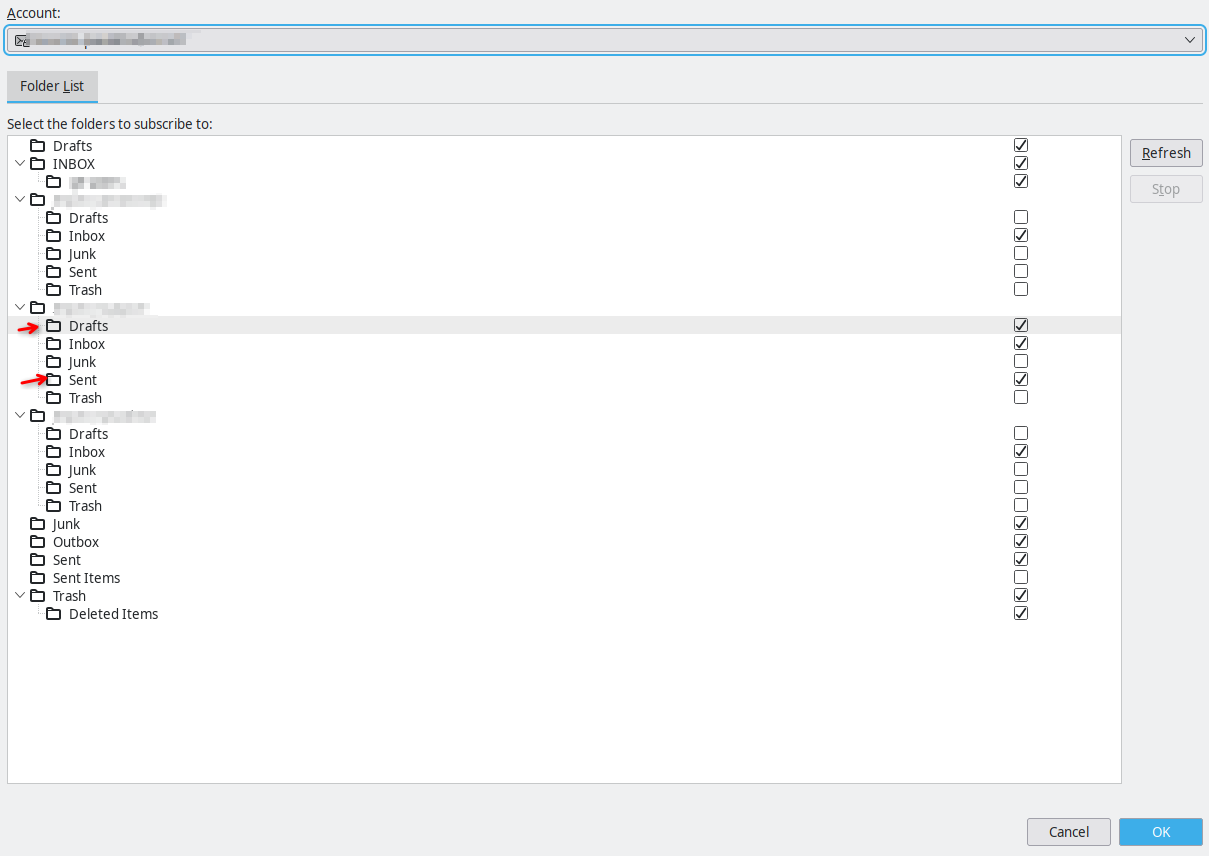
Hello, I have an IMAP acocunt configured, the server is Zimbra and has several shared Inboxes inside my account. Each of these inboxes come with several subfolders (which have the same name in every Inbox), and I would only like to keep some of them displayed in Thunderbird, but the unsubscribe option does not work for a few of them.

I open up the "Subscribe" dialog, I can correctly navigate to the fiolders I want to unsubscribe and click them, which unchecks the mark. I click "Ok" and nothing happens. If I reopen the Subscribe dialog, the folders are checked, as if I did nothing.

Note that I can unsubscribe to most folder, only a couple of them have this problematic behavior.

I have tried enabling/disabling the "Show all folder" option in the Advanced account panel and Enabling/Disabling the local storage for these folders.

I have also tried to unsubscribe the folders, then manually erasing the mbox files and indexes in the account folder before clicking Ok. The msf file are immediately recreated.

In the screenshot, the folders marked with an arrow cannot be unsubscribed, no matter what I tried.
Hello, I have an IMAP acocunt configured, the server is Zimbra and has several shared Inboxes inside my account. Each of these inboxes come with several subfolders (which have the same name in every Inbox), and I would only like to keep some of them displayed in Thunderbird, but the unsubscribe option does not work for a few of them. I open up the "Subscribe" dialog, I can correctly navigate to the fiolders I want to unsubscribe and click them, which unchecks the mark. I click "Ok" and nothing happens. If I reopen the Subscribe dialog, the folders are checked, as if I did nothing. Note that I can unsubscribe to most folder, only a couple of them have this problematic behavior. I have tried enabling/disabling the "Show all folder" option in the Advanced account panel and Enabling/Disabling the local storage for these folders. I have also tried to unsubscribe the folders, then manually erasing the mbox files and indexes in the account folder before clicking Ok. The msf file are immediately recreated. In the screenshot, the folders marked with an arrow cannot be unsubscribed, no matter what I tried.
Attached screenshots

You must log in to your account to reply to posts. Please start a new question, if you do not have an account yet.