Dragging and dropping attachments out of Thunderbird creates multiple copies

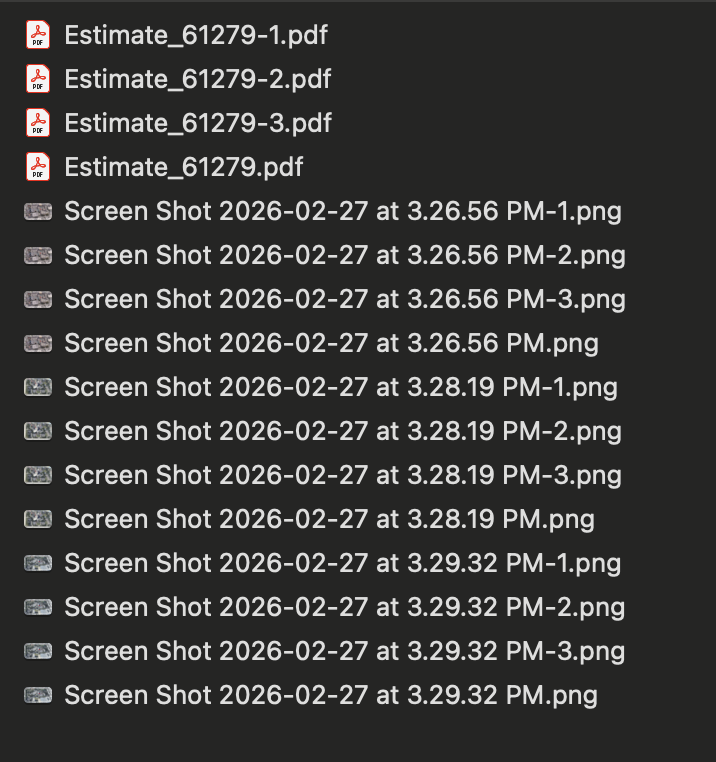
I routinely drag and drop attachments out of an incoming email and into various desktop folders. However, in the last couple of days, it started creating multiple copies when dragging more than one attachment at a time AND doing it in multiples of the number of attachments. For example, if I drag four attachments over, it will save the original attachment and create three more and number them: ex. File.pdf (original) and File-1.pdf, File-2.pdf, File-3.pdf. Three file equals two copies, six files equals five copies, and so on. Dragging one attachment is fine and saving multiples via SAVE ALL works fine as well. It's only multiples via drag and drop. I am running the latest Thunderbird 148.0 on a Mac with Tahoe 26.3.
I routinely drag and drop attachments out of an incoming email and into various desktop folders. However, in the last couple of days, it started creating multiple copies when dragging more than one attachment at a time AND doing it in multiples of the number of attachments. For example, if I drag four attachments over, it will save the original attachment and create three more and number them: ex. File.pdf (original) and File-1.pdf, File-2.pdf, File-3.pdf. Three file equals two copies, six files equals five copies, and so on. Dragging one attachment is fine and saving multiples via SAVE ALL works fine as well. It's only multiples via drag and drop. I am running the latest Thunderbird 148.0 on a Mac with Tahoe 26.3.