


beID pcscd
Since installing 'pcscd' to support the Belgian eID, FF takes up to 5 minutes to start. This used to work flawless.
All Replies (12)
Dirk said
Since installing 'pcscd' to support the Belgian eID, FF takes up to 5 minutes to start. This used to work flawless.
So the next logical step would be to remove the spyware... I mean software and see if it makes a difference. What are you seeing in the logs when starting Firefox?

Modified by jonzn4SUSE
Thanks for your quick respons. Starting FF takes up to 5 minutes. Removing pcscd isn't an option : without that no connection to public services. No error logs whatsoever, just delay.
The best thing would be to ask other users of the same process on the same OS.
If your OS has the live usb stick you test without that extra process and also VM. Mark this as resolved if no further questions.
The live USB doesn't provide the right libs, so it's useless. Pcscd interferes with FF, and I don't see a way out.
Found the below in this search result. https://pcsclite.apdu.fr/
If you run this, it will generate a log file that will show what's going on while Firefox is starting.
strace -t -o firefox_debug.txt firefox &
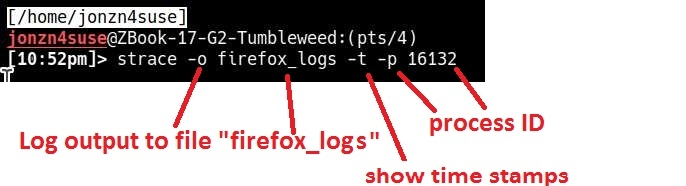
Hi, Thanks for the tip. Following is the output :
'trace -t -o firefox_debug.txt firefox &
dirk@Citadel:~$ strace -t -o firefox_debug.txt firefox & [1] 2619 dirk@Citadel:~$ [2622, Main Thread] WARNING: Theme parsing error: gtk.css:4:0: Expected semicolon: 'glib warning', file /builds/worker/checkouts/gecko/toolkit/xre/nsSigHandlers.cpp:201
(firefox:2622): Gtk-WARNING **: 16:25:56.399: Theme parsing error: gtk.css:4:0: Expected semicolon [2622, Main Thread] WARNING: Theme parsing error: gtk.css:7:0: expected '}' after declarations: 'glib warning', file /builds/worker/checkouts/gecko/toolkit/xre/nsSigHandlers.cpp:201
(firefox:2622): Gtk-WARNING **: 16:25:56.399: Theme parsing error: gtk.css:7:0: expected '}' after declarations ATTENTION: default value of option mesa_glthread overridden by environment.
[1]+ Klaar
BTW, OS is Linux Mint 22.3; Kernel 6.18.5 XanMod Cheers
Hi Dirk
Is this a build of Firefox that came with Mint or one you have installed yourself direct from Mozilla?
Just to rule it out, you may want to try a build straight from Mozilla.
Hi,
I'm using the build provided by Mint. This was forced upon me in the latest update/upgrade. Before that I used the latest ESR, but it seems this doesn't work anymore in Mint 22.3 :( Guess I'll have to live with it for now.
Cheers
Paul said
Hi Dirk Is this a build of Firefox that came with Mint or one you have installed yourself direct from Mozilla? Just to rule it out, you may want to try a build straight from Mozilla.
Download, unzip, and run firefox-bin from the folder and see if you have the same issue. https://www.mozilla.org/en-US/firefox/all/#product-desktop-release
If you're throwing in the towel, just mark it as resolved and have a nice day.