Menus and toolbars

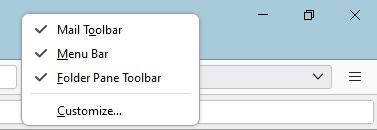
I accidentally lost the menu bar but got it back temporarily reading the article. However,, I have been unable to get it back permanently because, contrary to the article, right on a empty section of the tab strip does NOT produce a popup menu to check.
Also, I have lost the threehorizontal bars on hte right.
I can print an email now but not when it is oped because the menu dissapears then
I finf this who menue and toobar subject very complicated and confusing. It was simpler in previous versions.
All Replies (1)
Ok, pressing alt will make it visible while you hold the key. Pressing F10 will make it visible all the time until you use it.
Press F10. Select the view menu > select toolbars and select every entry on that menu. I turn off the spaces toolbar. But turn them all on to start and turn off the ones you do not like.
BTW right clicking on any blank space on the menu bar, toolbar or even the windows header (just left of the minimize button) will all produce the menu you say does not appear.