

This thread was archived.
Please ask a new question if you need help.

Archived
Lightning calendar and task tabs interfering with Ultramon icons in the upper right corner of the window.

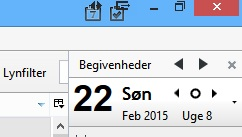
As I today reinstalled Thunderbird and Lightning, I discovered, that the 2 small tabs (Calendar and tasks) in the upper right corner of the window is interfering with the icons at the same place from the program Ultramon, that i use because I now are working with 2 displays. Are there any way to move those 2 tabs a little further to the right? It is not a very big problem, but a bit annoying to click at the tasks tab, and the window jumps to the next screen. Any easy solution?
As I today reinstalled Thunderbird and Lightning, I discovered, that the 2 small tabs (Calendar and tasks) in the upper right corner of the window is interfering with the icons at the same place from the program Ultramon, that i use because I now are working with 2 displays.
Are there any way to move those 2 tabs a little further to the right?
It is not a very big problem, but a bit annoying to click at the tasks tab, and the window jumps to the next screen.
Any easy solution?
All Replies (1)
hbirch said
As I today reinstalled Thunderbird and Lightning, I discovered, that the 2 small tabs (Calendar and tasks) in the upper right corner of the window is interfering with the icons at the same place from the program Ultramon, that i use because I now are working with 2 displays. Are there any way to move those 2 tabs a little further to the right? It is not a very big problem, but a bit annoying to click at the tasks tab, and the window jumps to the next screen. Any easy solution?
Rubbish !! Of course I meant move to the left - sorry