I wnet to a web site tonight and a meeage from FireFox displayed that I was not on the current release. I know which release I'm on and at this time I do not wish to upgrade my release.

I use release 3.5.1 of FF because it is compatible with the software I use. Nothing worse than you nagging me that I'm not on the most current release. Get off my ******* back. Stop the nagging messages. I'll upgrade when I'm ******* good and ready to upgrade. Un F'n believable!
Edited by a moderator due to language. See the Rules & Guidelines .
I use release 3.5.1 of FF because it is compatible with the software I use. Nothing worse than you nagging me that I'm not on the most current release. Get off my ******* back. Stop the nagging messages. I'll upgrade when I'm ******* good and ready to upgrade. Un F'n believable!
''Edited by a moderator due to language. See the [http://support.mozilla.com/kb/Forum+and+chat+rules+and+guidelines Rules & Guidelines] .''
the-edmeister দ্বারা পরিমিত
All Replies (1)
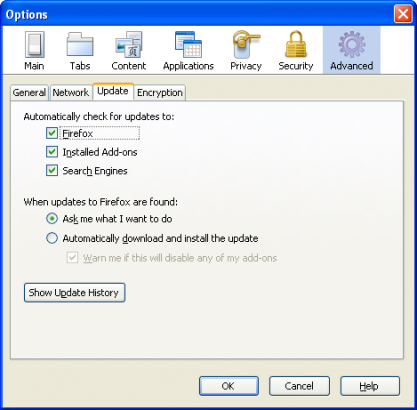
The solution is simple. Go to Tools, select Options, a window will pop up. Click Advanced, select Update tab. In the options 'Automatically check updated to', uncheck 'Firefox'. Click Ok, you're done. :)