


yahoo folders have disappeared

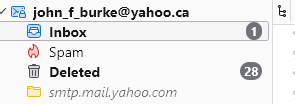
Here we go again,I was unable to send email from my yahoo,ca account. I managed to get a password form yahoo and when I re-logged in, all my folders have disappeared. They are still on the webmail version on yahoo.ca, I can now send email though How can I get them back as the folder that the email has: C:\Users\John\AppData\Roaming\Thunderbird\Profiles\a51cb43e.default-release\ImapMail\imap.mail.yahoo-4.com Does not work
I also have Gmail issues for another time
Wayne Mery দ্বারা পরিমিত
All Replies (1)
IMAP is a fully syncronised protocol. These forums are full of folk that appear to be unaware they have no local archival store of mail, only a local IMAP store that is deleted as soon as there is a connectivity issue. It is best described as a cache.
Your folders will have been deleted from Thunderbird because Thunderbird can not confirm they exist from the mail server (It is the canonical source). I would help you with the connectivity issue, but you offer no information about the errors you receive. My guess is you have an antivirus problem, but that s based on the sheer number of folk that come to these forums reporting mail issues that have a mail scanner preventing mail working, or a third party software firewall or a VPN. Commonly these product show no error or warning. They just stop the mail process dead in it's tracks. It is one of the reasons I use Windows defender. It has no pretentious about email, spam et. al.
Fix you connectivity and your folder will again download and be populated. If you add the account again the folder name will increment by one. imap.mail.yahoo-4.com indicates you already have added a yahoo account 4 times to Thunderbird.
Looking at your history. You did not fix your issue here.https://support.mozilla.org/en-US/questions/1587761 You made it work temporarily using an application password. You really need to change the hidden preference to fix Yahoos poor implementation of the use of cookies and use oauth which is Yahoos preferred authentication method.. I told you how to do it. You did something else, it worked for a while and your back.
Way back here https://support.mozilla.org/en-US/questions/1556767?page=1 You posted this image of your settings.
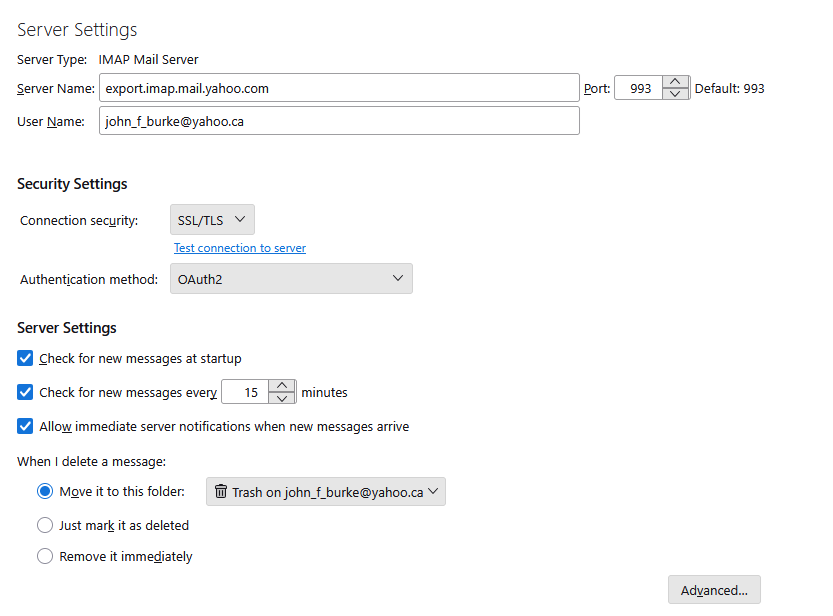
That Export address is something Yahoo cooked up. They really do not document what it does or how it works it looks a bit like an IMAP server but only offers one way synchronization apparently. I really have no idea how it really works or even if it does.
Asking anyone but Yahoo is probably unreasonable because hard facts about it are rare and even what Yahoo have published appear to conflate IMAP and POP so I really wonder if Yahoo can actually describe the service and how it functions, but only they stand a real chance as they invented it.. This export server is something that only exist in the context of Yahoo mail and apparently does not follow the standard. See here for the standard all IMAP server should follow. https://www.rfc-editor.org/info/rfc9051/
My guess is the same connectivity issue you have with Yahoo will be also affecting your Gmail account.
I would also venture based on probability that a third party antivirus that scans mail or makes it's own decisions on SPAM and SCAM is the root cause. Most use self signed certificates to scan mail and you see those certificates frequently loosing the manual trust that is required when the thing is setup and unfortunately low level certificate issues have a habit of not bubbling error to the user interface (or windows notifications which is now the standard) %To make sure you are aware of all the associated errors do the following;
- Open the error console (Ctrl+Shift+J)
- Clear it using the trash icon in its toolbar
- Try getting mail.
- Report any error that appears in the error console. (right click will allow copy of the error for paste into a reply here.