


Thunderbird hangs due to POP3 server error right at the start. "An error occurred with the pop3 mail server. Unable to write to the mailbox""

Was on version 115, had this problem. Updated to version 155, same problem. One of the email accounts I set up on Thunderbird is redacted1@lake48.net, registered with 123-Reg. However, this is a forwarding address and has no email server, which is why I am getting the error now.
Messages addressed to redacted1@lake48.net are forwarded to redacted2@lake48.net, which does have a server, My system was to download from there and use a rule to divert the incoming message to my redacted1@lake48.net Inbox. This has worked OK until now. Thunderbird gives me this error right at the start and then does not respond, so I cannot get in to investigate account settings, and cannot access emails in other accounts such as gmail. 123-Reg has today changed its system, assuring me I don't need to change anything. Clearly I do, but I can't get in to change it.
What should I do to resolve this? I have no other access to my emails.
Wayne Mery দ্বারা পরিমিত
All Replies (8)
Is your profile on a file share?
I don't think I'm on a file share. However, I must correct the information I gave, in that the forwarding goes to my Gmail address not ******@lake48.net, which I can receive through my browser. However, I still need Thunderbird for access to my old emails.
I don't understand what you are seeing. Screen shot?
Thanks for your response. Screenshot uploaded. I can click off both messages on OK, but then everything hangs and I get Thunderbird is not responding.
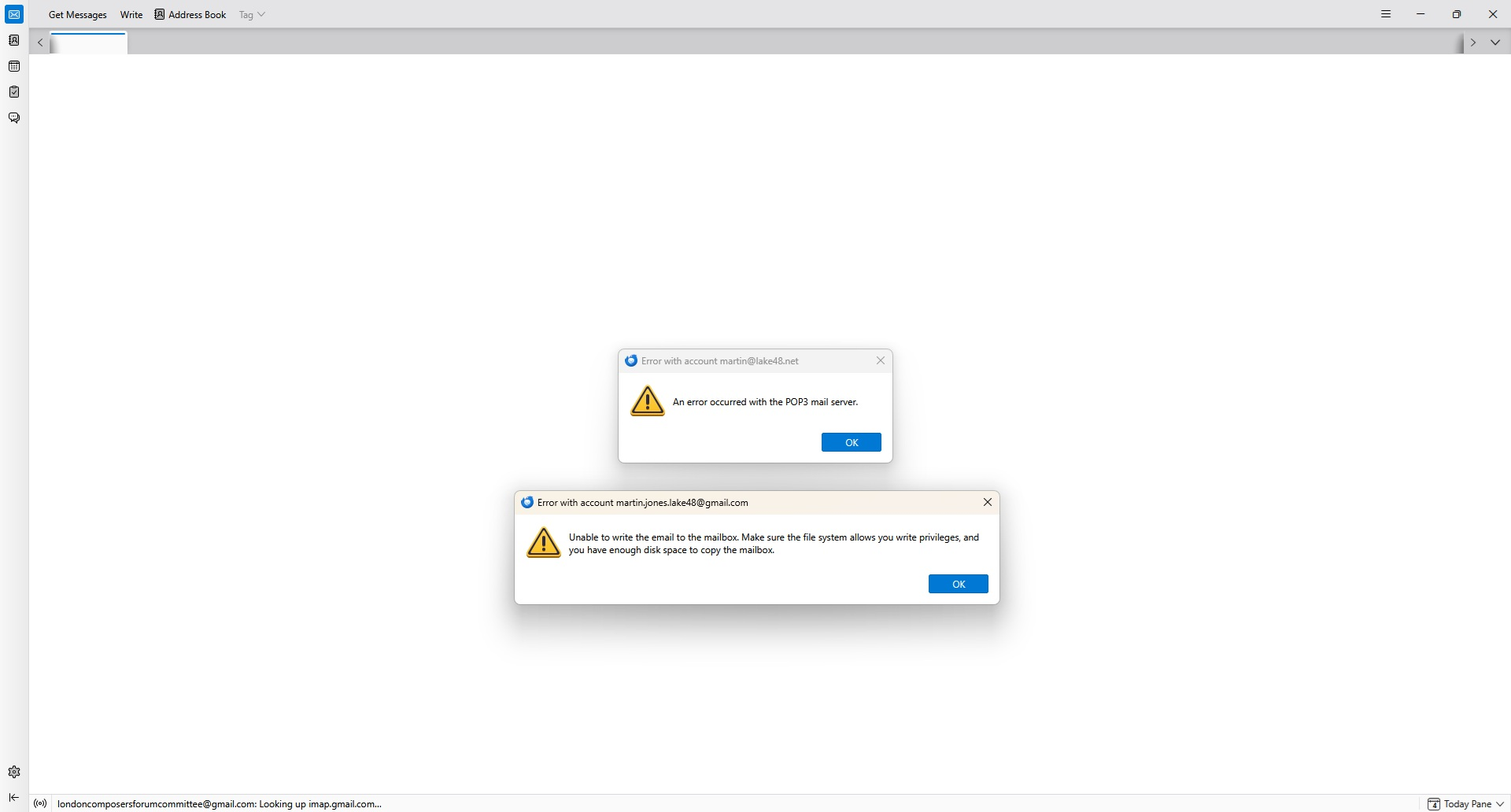
as far as I can see you are saying you have a pop mail account configured in Thunderbired with a blank server name. is that correct? I would not expect it to work, but it is what I think I am seeing stated.
It used to work, and I haven't changed anything in setting up the Thunderbird accounts. I suspect something has changed at the server end. I therefore need to get at my Thunderbird accounts to change the settings, i.e. to get beyond the initial crash. Is there another way to get at them, or can someone at Thunderbird change my account settings to avoid the crash?

> Was on version 115, had this problem. Updated to version 155, same problem.
I'm not understanding when the problem you are having happened. The above makes it sound like you had the problem on 115 (maybe a couple years ago?) and you still have the problem on 155 (now). But later you say
> This has worked OK until now.
So I'm not understanding on which TB version you first saw the issue. Was it a version before 115 where it worked the way you want it to?
Anyhow, if you can't get into your TB server settings to check the accounts, I think you will need to disable checking for mail at startup. However, I think you are saying you can't get to them due to the error pop-ups. So I think you going to have to disable checking for new mail at startup and checking for new mail every X seconds by (carefully!) edit the prefs.js file in your profile. (I'm assuming you know where to find you profile for now.) With with TB shutdown, open prefs.js in an editor. Find the group of items that start with "mail.server.serverX" where X is the index number for your problem accounts/servers, i.e., the gmail account doing the filtering and and different X value for the other account which "doesn't have a server". In both of these set user_pref("mail.server.serverX.check_new_mail", false);" and, if it exists set "user_pref("mail.server.serverX.check_time", 1000);" or you can just delete the full "check_time" line. Doing this will prevent new mail from being polled for at TB startup on these two accounts. It will also prevent new mail from being checked on a timed basis if you delete the full "time_check" line or it will check it after 1000 minutes so you have plenty of time to check the setting after you start TB before you get the lock-up (or crash as you called it).
Again, if you do this be careful editing the pref.js file and ONLY WITH TB SHUTDOWN. It's suggested to create a user.js file in your profile along side prefs.js with these changes so you might try that first before directly editing prefs.js. But you still need to determine the "X" value for you two problem servers by looking in prefs.js. (Note also, I'm assuming you can't getting into Config Editor when you run TB, which is the best way to change these prefs.)
If after you do this and can go into server setting for the two POP3 accounts, please post your exact setting for both servers (including any "advanced" setting). As Matt pointed out, I don't know how you ever configured a "blank or empty" server name for an account.
Correction: There are actually 3 pref items that affect checking for new mail and my description above is not 100% right. Here's the ones you need to look for and adjust:
user_pref(mail.server.serverX.check_new_mail", true); <-- set this false to disable timed checks for new mail.
user_pref("mail.server.serverX.check_time", 10); <--- time in sec n/a if check_new_mail is false. Or set this big (e.g., 1000 seconds) and keep check_new_mail true.
user_pref("mail.server.serverX.login_at_startup", true); <--- set this false to disable check for new mail at startup. (I confused this with "check_new_mail" in my previous comment.)b
Note: if the true/false prefs above don't exist in prefs.js or are deleted then they are seen as false.