


Errors in compose menu after Update to 153.0.1esr (Menus gone)

Hi folks, I'm a happy Thunderbird user since more than 20 years.
I just updated my TB to Version V.153.0.1esr.
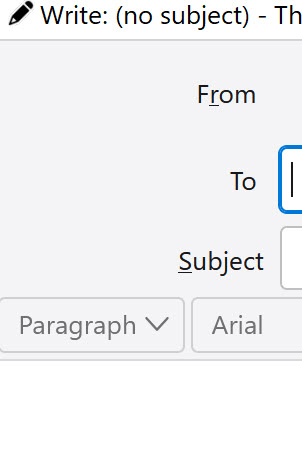
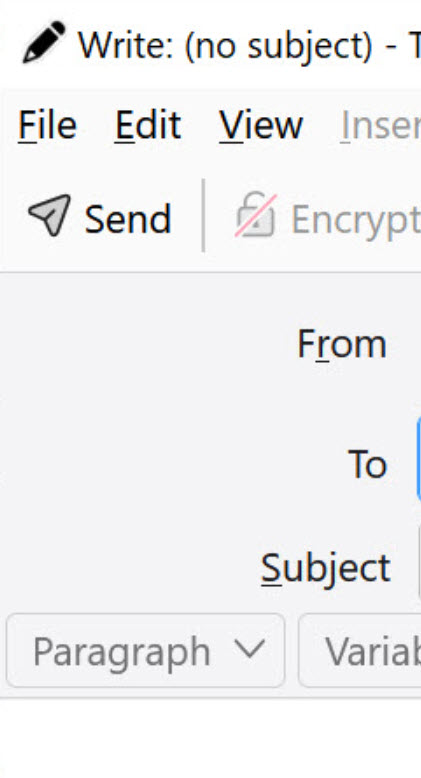
Then I want to compose an eMail and suddenly I recognized the two Menus with File, Edit, View and Send.... Attach are gone.
Normally from the top to the buttom I see the following menu lines: 1. Write: (no subject).... 2. File Edit View... 3. Send........ and Attach at the end 4. From.. 5. To... 6. Subject 7. The line with Paragraph etc. 8. The area to put my email text in
The lines 2. and 3. are fully gone.
Can you please give an answer how to reactive the lines 2. und 3. during composing an eMail?

All Replies (2)

চয়ন করা সমাধান
While in the Write window, press <Alt> or <F10> to reveal the Menu Bar. Then, click <View | Toolbars> and enable Menu Bar and Composition Toolbar.
Hi Lin, I appreciate your answer. It works. Thanks you!!!!!!!!!!!