


Line throught emails.

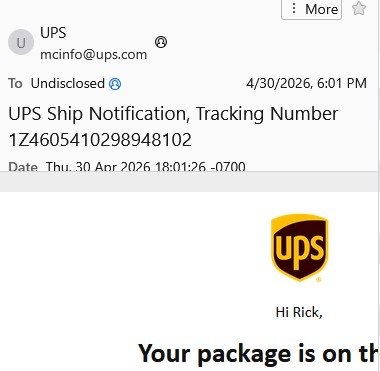
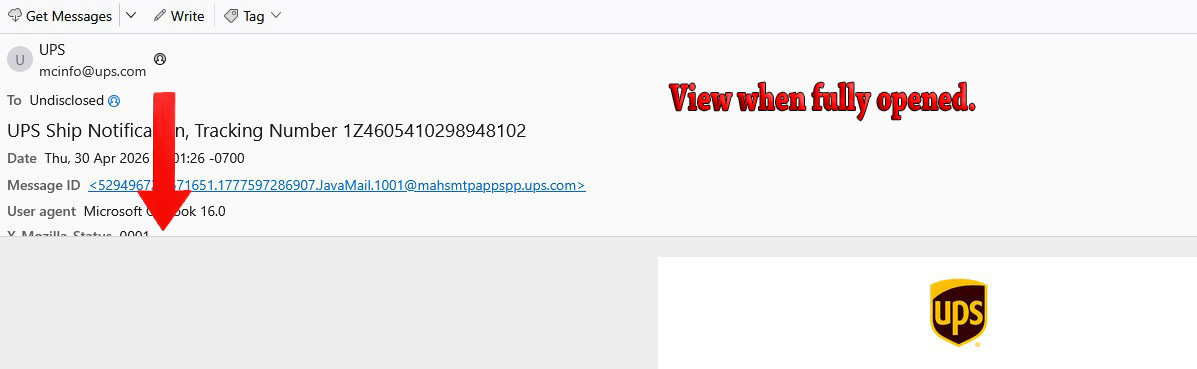
I open Thunderbird and see the list of received emails as usual and I have a "Viewing Pane" on the right. In the viweing pane I can see a portion of the email. However, there is a line going through the top portion of the viewing pane email and I cannot see what is under the line. I then fully open the email and the line is still there.
I have tried everything I can think of to fix this to no avail. I have even shut down Viewing Pane in settings and even then when I open an email it is still there.
I am trying to get Thunderbird to function in similar manner of Outlook Classic but the simplest of settings such as viewing pane just won't work. Thunderbird is up to date and Cache cleared. I have attached two photos to show what I am seeing.
Richard Hart
All Replies (1)

You can't move that line. The headers pane is of fixed size. However, there's a scroll bar at the right so you can view all the headers. You might also be able to scroll with the mouse wheel.
I wonder if you really want to display all headers? Most of them are not useful in everyday life. Unless you have a good reason, you might be more comfortable with the "Normal Headers" setting. This will display only the most useful header, plus they will all fit inside the Headers pane without needing to scroll. See menu item <View | Headers>.