


Add User Agent with correct platform information

Hello,
I am using Thunderbird on my arm64 Linux machines (Raspberry Pi 4 and 5 and my Odroid C2) and I want Thunderbird to send the correct platform information in the User-Agent line. After enabling Thunderbird to sent the full User-Agent line the following information is currently sent:
User agent:Mozilla/5.0 (X11; Linux x86_64; rv:140.0) Gecko/20100101 Firefox/140.0 Thunderbird/140.9.0
Everything is correct except for 'x86_64'. I would like to have sent the actual 'arm64' information because I'm proud using my small ARM64 machines as workstations and as a replacement for classic PCs and I do want to have this information distributed with every mail I am sending with Thunderbird.
Is there an easy way to get the correct information about my arm64 machines into the User agent line?
I am happy for any advice and help.
Kind regards,
Roland
All Replies (4)

I find a discussion of this issue and a suggested solution that involves making changes in the Config Editor. I can't vouch for its effectiveness.
https://support.mozilla.org/en-US/questions/1420558
I would make a backup copy of your prefs.js file while Thunderbird is closed before doing this.
Hello Lin, thank you very much for your answer. It helped me changing my user agent string. Here my steps to adapt my user agent. Starting the Config Editor in the Thunderbird settings. There I searched for the string 'useragent'. I changed "general.useragent.compatMode.firefox" back to the default (false). This removed the firefox string in the user agent line: => User agent:Mozilla/5.0 (X11; Linux x86_64; rv:140.0) Gecko/20100101 Thunderbird/140.9.0
Afterwards I tried the suggestion in your thread and added the new config entry "general.useragent.override" with the desired user agent string. Medhasree Suram description was good. In the search bar search for "general.useragent.override" choose String radio button and afterwards click on the + button which is shown right of the String radio button. In the new edit field you can enter the new user agent string and save by clicking on the ✓ button. In my case I've chosen Mozilla/5.0 (X11; Linux arm64; rv:140.0) Gecko/20100101 Thunderbird/140.9.0 as string for the user agent. I added a screenshot of my settings for the user agent.
Kind regards,
Roland
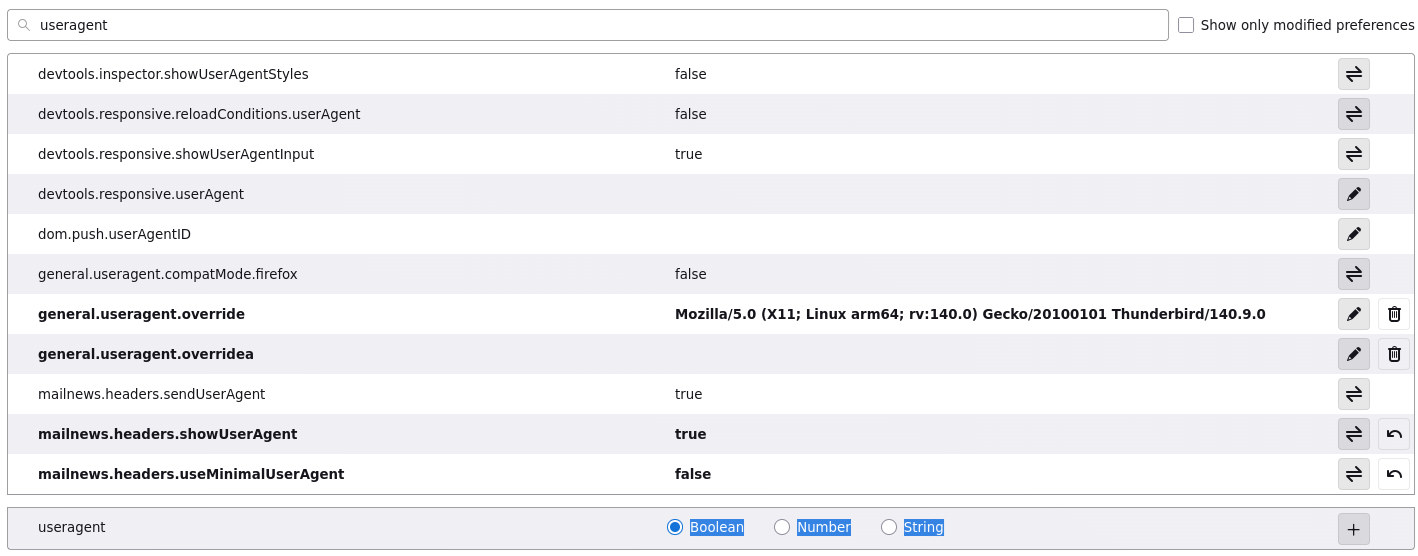
Hello, changing the user agent manually in the Config Editor by adding "general.useragent.override" and changing the string value is a workaround. Unfortunately it's a workaround with problems. Every time Thunderbird gets an update and a new version number you need to manually update the string to show the correct user agent string. In the concrete example the string "Mozilla/5.0 (X11; Linux arm64; rv:140.0) Gecko/20100101 Thunderbird/140.9.0" needs to be updated correctly. That's prone to errors and therefore this task should be done by Thunderbird itself because it already has all information and except for the platform everything already works correctly. Thunderbird just needs to replace "x86_64" in "Mozilla/5.0 (X11; Linux x86_64; rv:140.0) Gecko/20100101 Thunderbird/140.9.0" with the correct platform. I don't care whether "aarch64" or "arm64" is shown but "x86_64" is the wrong platform. It would be great if the Thunderbird developers could correct it in the source code.
Best regards,
Roland
I think that this is such a personal preference that there is little hope of the developers incorporating it into the default behavior of the program. I wouldn't expect it. It would be an ideal candidate for an extension, but as far as I can find, nobody has found it important enough to create one.
If it's important enough to you, you could make it easier for yourself by creating a "user.js" file (which can override default settings in "prefs.js") in your Thunderbird profile, and include the following lines:
   user_pref("mailnews.headers.useMinimalUserAgent", "false");
   user_pref("general.useragent.override", "ClownShow");
or whatever your preferred user-agent string would be. This overrides the default behavior. You would still have to manually edit that string with a text editor whenever Thunderbird updates itself, but it's easier than digging through the config editor.